Your Security Software May Be Unnecessarily Slowing Down Your Internet Experience

One easy way a webmaster can speed up their website is by enabling gzip compression on their web server. Most major websites do this and all modern browsers support receiving gzip encoded content. Sending out gzipped components greatly reduces the size of the response a web server sends to the browser and leads to the user having a faster experience with the website.

1 out of 5 US users don't take advantage of gzip compression on the web
Original Photo By allyaubry
Despite this being a plus for everyone, according to the book Even Faster Web Sites,around 20% of US users do not experience this enhancement. The number goes down to 15% when a world wide audience is considered, but that’s still a decent number of web surfers. The book states that the culprits behind the slowing down of the net for 15% of its users fall into two main categories:

  • Web Proxies
  • Computer Security Software

The reasons for this are that the above want to observe the responses from the web server and don’t want to have to decompress the files, so they either remove or mangle the “Accepts-Encoding:gzip” message that your browser sends to the web server. This leads to the web server thinking that the browser doesn’t support gzip compression, and therefore it sends back uncompressed data. The reason for mangling or stripping away the “Accepts-Encoding:gzip” message may have been to try and minimize the number of CPU cycles needed to examine data from the web server, but increasing download time to get around decompressing data is a poor trade off.

Many newer security software suites have since rectified this problem, but there are still some out there that unnecessarily hamper your web surfing. You can check and see if you’re apart of the 15% of people who don’t recieve gzipped data by going to the following link: Gzip Compression Test Page

Photo By alumroot
I’m writing this entry mainly because I’m doing a lot of front-end optimization at work and I ended up discovering that I was in the unfortunate 15% of web users who were missing out on a faster web experience. I also found out that my parents were in the same boat. If you click the link above and discover you are also not benefiting from gzip compression on the web, it’s worth temporarily disabling your security software and seeing if it is the cause of your problems. If you are unable to isolate the problem to software on your computer, it may be a web proxy which is removing/mangling the “Accepts-Encoding:gzip” message, and if that’s the case, you’re pretty much out of luck unless you control the proxy.

If you isolate the problem to your security suite, I would either try upgrading the software or switching to a different service. I dual boot my machine with Windows and Linux (my problem was only on Windows) and for Windows I’ve currently switched to using Microsoft’s Security Essentials for my virus checker (along with SpyBot), which LifeHacker seems to think is good enough, though I’m currently still researching the best tools to use.

If you are a webmaster and are interested in enabling gzip compression, you can find an easy-to-follow tutorial on how to do it here. If you want to go a little further down the rabbit hole, Yahoo! has put together a very nice list of techniques you can use to speed up your website.


Google Dictionary + Urban Dictionary + Flickr API

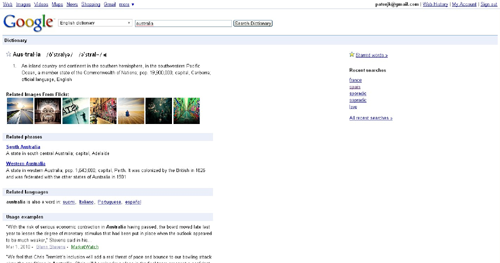
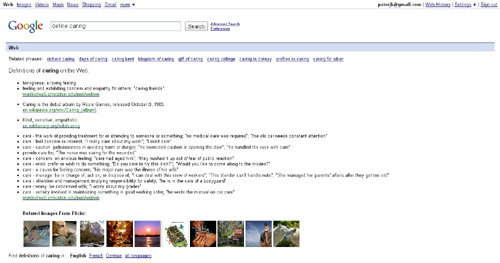
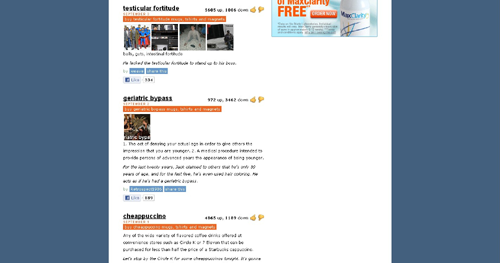
One of the characteristics of web browser extensions that excites me is that you can write plug-ins for your favorite websites. For my next extension I wanted to create something that was a plug-in to a specific website or websites. After mulling over possible ideas, I decided to create an extension would augment the definitions from dictionary websites with relevant images. The result is Image Definitions for Dictionaries, which is a Chrome web browser extension that augments the results of Google Dictionary, Google Search, and Urban Dictionary with images from Flickr.

Image From Homer Defined
The idea for this extension came from an episode of the Simpsons where Homer is repeatedly defined in the dictionary, with his picture appearing next to certain words. I thought it would be interesting if that’s how all dictionaries worked. They would have an image next to the word they were defining and that image would be determined by what the web thought was most relevant. I thought this would especially be interesting for the more eccentric dictionaries like Urban Dictionary. Urban Dictionary does already have an image feature, but it’s based on user uploads and isn’t heavily used.

After playing around for a little bit, I had an extension that worked for the previously mentioned sites. Below you can see a slideshow which lets you see how the Flickr thumbnails are integrated into the dictionary webpages (clicking on a thumbnail within a dictionary site will take you to the image’s Flickr page):

Previous Image
Next Image

info heading

info content

Using the Flickr API turned out to be a breeze, though most of the functionality I needed was already provided in an example created by Google. I did briefly look into using other APIs, or having the option for multiple APIs to be used, however, I wasn’t able to find a service comparable to Flickr’s API. Google’s has Google AJAX Search API, but that appears to be aimed at providing searching services and it doesn’t seem to give you access to individual thumbnails. I looked into some other services too, but nothing jumped out at me.

Anyway, I hope this extension can be of use to some of you or provide you with some entertainment value. If anyone has any requests for sites I should support, or has any suggestions for the extension, please let me know.

Typing Speed Monitor Version 1.0.2

Photo by ktpupp
I’ve made a small update to my Typing Speed Monitor Chrome web browser extension. You can now exclude statistics that come from certain domains. It was a feature requested in the comments section and I figured it would be useful for people who don’t want certain websites to effect their statistics.

I’m not sure how far I want to go with this app. I have a couple more feature ideas, and I would have added more with this update if I had not been busy working on another extension (see my next update). We’ll see though. If you have any feature requests just let me know.