I’ve created a new web app that allows you to analyze and visualize the typing patterns you create when you use a Qwerty, Dvorak, or Colemak keyboard layout. You can find it here: Typing Analyzer.
If you have no idea what I’m talking about, the keyboard layout you’re currently isn’t the only one that’s out there, and not all keyboard layouts are created equal. Some are better for your wrists and allow you to type faster and with more comfort. Here are the layouts of the keyboards I mentioned above:
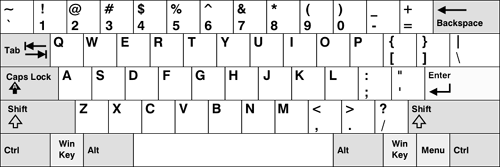
Qwerty
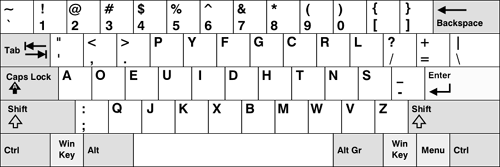
Dvorak
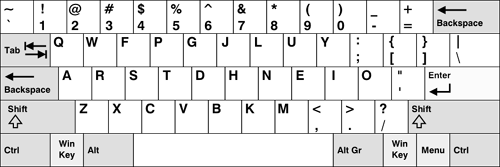
Colemak
My interest in keyboard layouts came after I read a Discover magazine article entitled “The Curse of QWERTY”. The article tells the story of the Qwerty and Dvorak keyboard layouts and makes a compelling case for switching from a Qwerty layout to a Dvorak layout. Here is a quick summary of its most important points:
- The Qwerty layout was created in the early 1870’s before touch typing and without speed or comfort in mind.
- The Dvorak layout was created in the 1930’s and is based on years of research. It takes speed and comfort into account.
- On average, the left hand does 56% of the typing when a Qwerty layout is used. With a Dvorak layout, the right hand does 56% of the typing.
- The Dvorak layout forces you to alternate hands more frequently when typing, this causes you to type faster.
- Users type fastest on the home row. With a Qwerty layout, only 32% of your typing occurs on the home row. With a Dvorak layout, 70% of your typing occurs on the home row.
- It’s hypothesized that the Dvorak layout will make it less likely that you’ll develop Carpal Tunnel Syndrome (CTS).
- Anecdotally, people who develop carpal tunnel syndrome seem to find relief when they switch from a Qwerty layout to Dvorak layout.
There are more reasons, but those were the ones that stuck with me. I was so convinced by what I read that I switched my work and home keyboard layouts to a Dvorak layout by configuring some Windows XP settings in the control panel (to see how click here). This lasted for about 6 days (3 of those were over the Labor Day weekend), and then I had to switch back since learning the Dvorak layout was slowing me down at work. I also discovered that the Dvorak layout made all the nice Qwerty keyboard shortcuts (Undo, Cut, Copy and Paste) virtually unusable. This was a big minus since I use those shortcuts constantly. The Dvorak layout also over worked my right pinky. I found myself having to take typing breaks, something I hadn’t done since high school.
After talking to someone who had Carpal Tunnel Syndrome (something I’m worried about getting), I learned about yet another improved keyboard layout that preserved Qwerty’s bottom row short cuts and didn’t put massive amounts of stress on the right pinky. This layout was known as the Colemak. Unlike the Dvorak, the Colemak layout is relatively new (developed within the last 5 years), doesn’t have a lot of research behind it, and it doesn’t have a very large following (online estimates put the number of users between 650 and 1,300). It also wasn’t on my computer at work (I can’t install things on my work computer) so in order to use it, I’d have to talk to some sys admin people. However, the layout looks really promising.
All of this research is what motivated me to create the Typing Analyzer. I wanted to visually compare my typing patterns with the different layouts and get some stats on what hand and which fingers I was using the most (a feature I’ll put in soon).
Hopefully the user interface is straight forward enough. Its in the same vein as the Image Color Palette Generator and the Color Fader, but with some adjustments. I decided to start the page off with a section explaining which fingers you use for which keys, since I know a lot of people don’t know the exact fingerings. In fact, I know people who constantly use a computer yet still hunt and peck for keys. After the chart comes the application’s controls and after that comes a section for the output.
I have more features in mind for this program, but I figured I’d release what I had now just to see how it’d be received and to see if anyone had any suggestions. The other ideas I have in mind are:
- Allowing a user to enter in a feed URL, so that the program can analyze all of their blog posts instead of having the user paste the text into the text box.
- Give stats on finger and hand usage. Possibly also include pie charts.
- Give recommendations to the user on which keyboard layout would benefit them the most.
Oh…
And I haven’t forgotten about patrickgillespie.com. I’m just not as excited about it as I was 10 days ago. I’m going to let myself mull over some more ideas before I take any action. I still don’t think I have the right idea for it yet.