Home

The Evolving Layout Of The Typing Speed Test

Posted by patorjk | Web Apps | Monday 22 June 2009 2:22 am

Coming up with a good looking, easy-to-use design is hard. Sometimes I feel like I spend more time trying to design an application’s layout than I do programming its back end, and most of the time the resulting layout isn’t that impressive. I think I’m just better at creating functionality than I am at making something that looks pretty. However, no one’s going to look at something if it looks like crap, and people tend to give applications more of a fair shake if they look nice, so I think the time I spend trying to become a better designer is worth it.

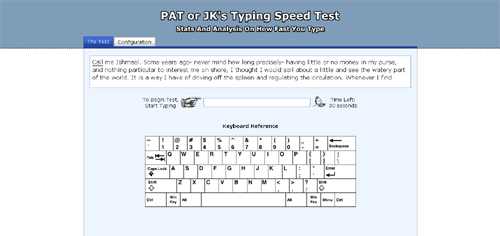
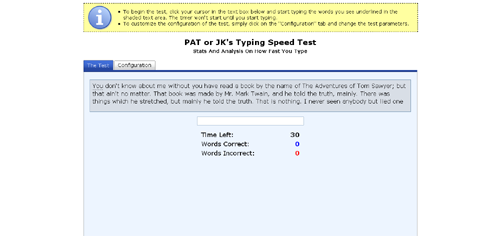
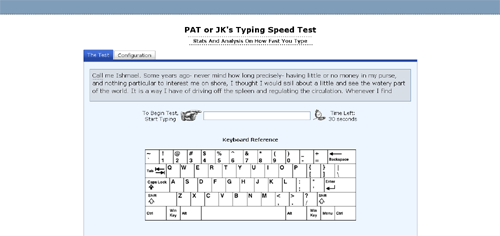
Recently I’ve taken to trying to improve the look of my Typing Speed Test. Below you can see the initial design, a design I put up last month, and the most recent design, which I put up this past weekend.
Initial Design

Initial Design

Second Layout

Second Layout

Current Layout

Current Layout

I made the initial design with the idea of keeping things as simple as possible, however, in retrospect, the page looks kind of unbalanced and the big yellow explanation box at the top kind of comes off as a little bit of an eye sore. The second layout was made with the aim of being a bit more stylish. I got ride of the yellow explanation box, threw in some small gifs, added a keyboard reference, and put in a header bar to make it seem a little less plain.

The third, and current layout, was made with the aim of trying to make something that, in my mind, looked good. I don’t think I quiet accomplished that, but I think I came up with something better than what I had. The interface seems cleaner and more balanced, and I like the additional color at the top of the page. The only thing I’m not sure I like are the header images, they seem a little cheesy. So I’ll probably keep tweaking the layout. My goal is to come up with something I can re-use on future (and existing) applications.

Dogs Days of Summer and Web App Versioning

Posted by patorjk | Personal,Web Apps | Wednesday 17 June 2009 1:22 am
Rising Sun

Rising Sun

I can’t remember a time when I was so exhausted. I’ve moved into my new townhouse, though it still feels like there’s a ton of stuff to do for it. I also got engaged recently, and even though the date is a year away it seems like there is a lot to do for it. I’ve also been working 50-55 hour weeks at work the past few weeks, usually leaving work around 10pm. That last one isn’t too bad, since I’m getting overtime and I know people who’ve done much worse (I have a friend who told me he once did a 27 hour a day). However, it’s all left me a little worn out. However, I’ve still kept this site in my thoughts.

One behind the scenes thing I decided to look into was web app versioning. Sometimes I want to make a small update a program like Text Ascii Art Generator (TAAG), where I might need to change 3 or 4 files, yet if the user has certain files cached, the mish-mash of certain new and old files could cause the program not to work. There may be some obvious way of doing versioning that I’m just not aware of, but its something that’s bugged me for a while. I had been getting around this issue by naming the files I wanted to update something different (ex: font-settings-v1.htm became font-settings-v2.htm, etc), however, this seemed a rather messy way of doing it.

Recently I decided to put the whole app except for its index.htm file under a directory representing its version, and having the index.htm point to the sub-directories under the latest version. So the apps contents would be placed in a structure like this:

patorjk.com/software/taag/1.0.0/pages/ – Pages for the app
patorjk.com/software/taag/1.0.0/css/ – CSS files
patorjk.com/software/taag/1.0.0/scripts/ – Scripts
patorjk.com/software/taag/ – Where the index.htm file would go

This is nice because it allows me to go back in time if I screw something up. For example, if I decided I didn’t like version 1.0.1 of the app, I could go back to version 1.0.0 by just changing the index.htm file. This method also prevents any kind of awkward file combination due to cached files. However, it’s down sides are that I have to upload a whole new version of the app every time I update and I need to make sure users aren’t linking to or bookmarking pages underneath the version sub-folder. The app has to be set up so that the version folder is invisible – everything has to happen through the page at the base directory. This is so search engines wont index every single little version of the app.

So far this system seems to work pretty well, however, if anyone has any suggestions let me know.

In the weeks to come…

I imagine my free time to be kind of scarce for a while, but I have some ideas I want to work on, so updates will keep coming, but probably in a more sporadic manner.