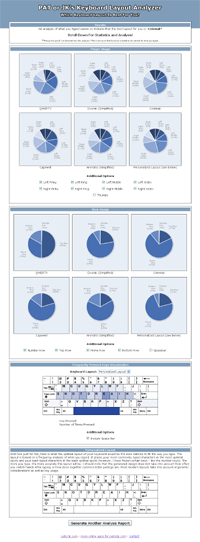
I’ve added a new feature into the Keyboard Layout Analyzer that will let you know the distance your fingers travel while racing across different keyboard layouts. It’s interesting not only because it lets you know how far your fingers are crawling, but because it lets you test out one of Dvorak’s claims on why his layout was better than the QWERTY layout:
Dvorak estimated that the fingers of an average typist in his day traveled between 12 and 20 miles on a qwerty keyboard; the same text on a Dvorak keyboard would require only about one mile of travel.
Below I have the results of several pieces of text I analyzed. The QWERTY, Dvorak, and Colemak layouts are compared against each other. The distance shown for each is just an estimate, but it appears as if the idea of typing 20 miles in a day is a little excessive. Also, the Dvorak layout only seems to give you a 40%-45% improvement over the QWERTY layout when it comes to the distance you type.

(It uses a QWERTY layout)
Photo By jasoneppink (cc)
George Orwell’s 1984 book, Chapter 1:
QWERTY – 0.5629 miles
Dvorak (Simplified) – 0.3107 miles
Colemak – 0.2935 miles
Christopher Nolan’s The Dark Knight Movie Script:
QWERTY – 3.0929 miles
Dvorak (Simplified) – 1.8838 miles
Colemak – 1.8497 miles
Jared Diamond’s The Curse of Qwerty article:
QWERTY – 0.3852 miles
Dvorak (Simplified) – 0.2173 miles
Colemak – 0.1938 miles
Steve Yegge’s Pinocchio Problem blog post:
QWERTY 0.7167 miles
Dvorak (Simplified) 0.4115 miles
Colemak 0.3619 miles
My Previous Post:
QWERTY – 0.0412 miles
Dvorak (Simplified) – 0.0233 miles
Colemak – 0.0211 miles
The algorithm for determining the distances is still being tweaked at the moment, so the distances may change in the future, however, it wont be dramatic. The biggest thing I have left to do is to factor in the pressing of the “shift” keys when an upper case letter is typed.
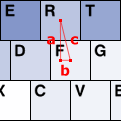
To the left you can see a diagram showing how the distance between two keys is calculated. The center coordinate of each key is known, so the Pythagorean theorem (c² = a² + b²) is used to calculate the distance between keys. The horizontal distance between the center of two letter keys that are next to each other is said to be 1.9 cm [reference]. This is 40 pixels in my set up. Therefore, I calculate the distance in pixels, and then convert it to meters by dividing by 40 and then multiplying by 0.019. I’m probably currently doing way more calculations than I should be doing, and that will be optimized later, but for now this is how its currently working.
If you’re skeptical about the distances you get back from the program, you can also try Colemack.com‘s Layout Comparison Tool, which also produces estimates on typing distances. They’ll be slightly different from what I display, but they’ll be within the same ballpark. As an aside, somehow I missed seeing that app until recently, but at least our programs have their divergences.
Let me know if you have any issues with the distance calculator. Also, I’ll hopefully have some more updates to the Keyboard Layout Analyzer coming within the next week or two.