Home

Muller Images Experiment

Posted by patorjk | Random Ideas | Thursday 24 June 2010 12:03 am

The Muller Formula is a neat little color formula that aims to predict which sets of colors people will find pleasing. No actual formula is given for it, but it’s concept is described. Given a set of colors with the same hue but a different lightness, the colors with the lighter hues should be shifted to a more naturally bright color and the colors with a darker hues should be shifted to a more naturally dark color. I thought this was a neat idea and figured I could possibly simplify it to work with a single color (what I decided to call a “Muller Color”). If a color had a high lightness, its hue would be shifted to a naturally light color. If it had a low lightness, its hue would be shifted towards a naturally darker color.
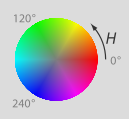
HSL Color Wheel
Image By Jacob Rus

The original article used a the traditional artist’s Red-Yellow-Blue color wheel. I wasn’t able to find a good conversion formula to go from the Red-Green-Blue color model (RGB) (which is popular in computing) to the Red-Yellow-Blue color model (RYB), but I did find formulas to go from RGB to the Hue-Saturation-Lightness color model (HSL). I figured this would work well since the HSL model had everything I needed to calculate a “Muller Color”. I could detect the lightness of a color and then adjust its hue accordingly.

Looking at the HSL color wheel, I decided to use the primary colors (Red, Blue and Green) as the more naturally dark colors, and the secondary colors (Yellow, Cyan, Magenta) as the more naturally light colors. This decision was just based on my own judgement. Using the HSL color model and the concept described by the Muller Formula, I was able to generate interesting colors from RGB inputs. And to make a long story short, I ended up using this idea in my Image to Color Palette Generator app. A color palette would be generated of an image, but in addition, the user would also see a palette of the corresponding Muller Colors.
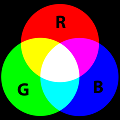
Primary and Secondary Colors
Image By SharkD

I figured I was done with this idea until I received a recent email from someone suggesting I take the images people input into the Color Palette Generator program and create “Muller Images”. Basically, call the Muller Color formula on every pixel in the image and generate a new image. I thought this was a really cool idea so I whipped up a quick prototype which you can see here. The shift percent indicates how much a color should shift. For example, if the color is between red and yellow and the shift is 100%, it will become yellow if it’s light and red if it’s dark (a dark yellow would even end up becoming red and a light red would end up becoming yellow). If the shift is just 50%, it will just shift 50% of the way closer.

Unfortunately, the results weren’t as stellar as I hoped. Calling the Muller Color formula on every pixel caused them to gravitate towards similar colors, so the resulting image tended to look like poorly compressed gifs. An example of a 10% shift can be seen in the Bernie Madoff pumpkin pic below.

Normal Image and Muller Color-ed Image

It was still a cool idea, and maybe it could still be used for something, though it’d probably have to be tweaked a little bit. There are other images available to Muller-ize on the experiment page if anyone else is interested. Thanks to David Dailey for the idea on this one.

Thoughts on Yesterday’s Events

Posted by patorjk | Personal | Tuesday 22 June 2010 9:49 pm

Photo By Axel-D

My head is still spinning a bit from yesterday. I couldn’t really take in everything that was going on since I was having to run around a lot at work, however, I figured I’d post some final thoughts since I don’t feel like I defended myself well enough against Marak and friends’ attacks.

Firstly, the source to TAAG isn’t “weak sauce”, it’s pretty cool. It generates neat ASCII Art text in real time, works with FIGlet and my own font file formats, allows you to generate images, test multiple fonts at once, implements the FIGlet smushing feature, and a whole host of other things. If it wasn’t any good, I (or even you, Marak) wouldn’t have been able to continually build on it. It’s not my best work though, and if I were to do it again today (knowing all that I now know about JavaScript), I would approach its design differently. Also, to quote the very kind reddit user elmuerte, who actually went though and compared Marak’s code and my code:

I checked his changes. And most of the work was actually removing the code that read the configuration from the “control frame” in patorjk TAAG website.
patorjk wrote the code specifically for his website, this other guy just made it more generic. That’s not really what I would call “removing crap to get it working”.

Secondly, I am a hobbyist, but I’m also a professional Software Engineer. I’m not a “weekend hobbyist” or a “plumber with a fireman’s axe”. It boggles my mind that someone would take my code, use it to their advantage, and then blast me like I was Cletus from the Simpsons. I’m good at what I do, in fact, I kick ass. I read books on programming in my spare time, I have hobby projects, I’ve got a BS and an MS in Computer Science (all A’s and one B for my undergrad), and I’m considered one of the best where I work. I know it’s a real pompous thing for me to make this kind of list, and I normally wouldn’t bring this stuff up (hopefully I’m not sounding like an arrogant dick – I don’t mean to), but I feel like I’ve been shamed with misinformation by Marak and his cronies for not letting him have my code.

Thirdly, I’m glad I saw this reddit comment by itsnotlupus:

It’s a little upsetting to read so many boneheaded comments on his blogs, ranging from “you got credited so what’s wrong?” to “your code sucks anyway”, with a dash of “you shoulda made it harder to steal then.”
I kinda hope most of those are just the guy caught in the cookie jar that felt like trolling, or it paints a rather bleak picture of that blog’s readership.

I’m almost completely sure it was Marak. Marak’s comments kept coming from different IPs, though I did catch him and another user posting under the same IP for one post each. Another pair of Marak supporters also had the same IPs for one post. My hypothesis would be that Marak was posting under many different user names in an attempt to make it look like he had lots of support.

Lastly, as far as open sourcing TAAG is concerned, I don’t think I’d enjoy writing a JS library in the wake of this. This whole experience has just left me with a really bad taste in my mouth and I’d like it to be over with. However, I would imagine there will be those interested in using one since yesterday’s post attracted a lot of attention (around 40k visitors). I did a quick search on github and 5ivestar has a JavaScript FIGlet project. Scott Gonzalez has also started a FIGlet project. So there will probably be options for a complete JS FIGlet library in the future. I want people to know I’m not against open source, I’m just against taking someone’s source without their permission.

Anyway, I’m done with this situation. There will be no comment thread in this post. Thanks to anyone who took the time to have my back.

AsciiMo – Where have I seen this before?

Posted by patorjk | General News,Web Apps | Monday 21 June 2010 2:22 am

/*
asciimo.js – written by Marak Squires
saved from the internet @ http://patorjk.com/software/taag/

i had to do unholy things to make the original code work, seriously.
check the commit logs on github and you’ll see how much “code” i had to delete and refactor.
what’s left isnt really acceptable, but it does work.

let’s clean this up and get a more comprehensive font database!

— Marak
*/

How I picture code thieves

So that’s the header comment to a new open source project called asciimo. Though I’ve never heard of the project, it’s actually composed of the inner workings of my Text Ascii Art Generator (TAAG) web app. I’ve never heard of Marak Squires either, and I don’t particularly like his snarky comments about his difficultly in stealing of my work.

I’ve had stuff taken from this site. Sometimes it’s makes me smile, other times it makes me shake my head. This makes me shake my head. TAAG was the project I used to return to JavaScript. It was written with JavaScript knowledge I remembered from the late nineties. It was a project I did for fun. Hell, I didn’t even know what AJAX was when I first released it. Underneath it ain’t so pretty, but it’s mine and not some jerk’s ticket to getting a lot of attention for themselves.

I should probably be angrier, but I’m actually mostly just disappointed that someone did this. This is lazy and selfish. I develop all sorts of random stuff, and I do it for fun. If I see a concept I like, I’ll try and make my own version, I don’t take someone else’s. When I see something like this, it’s upsetting. Is it for some quick attention? So they can state that they’ve started X number of open source projects on their resume?

I was initially told of this project through email (thank you Jan), though I later found Marak’s self promotion on reddit (edit: screen capture from saved html file – he deleted some of his comments). His response to my comments was that because I didn’t explicitly put a copyright notice in my code that he could use it however he wanted (which I’m pretty sure isn’t true). He tried to say he did it for altruistic reasons, but FIGlet itself is open source, and there are already PHP modules available for people looking to use it in the browser (here and here).

Maybe in another universe we could have had some kind of cool collaboration, but at least in this one, Marak doesn’t seem like the type of person I’d want to collaborate with. He comes off as abrasive, self-centered and thoughtless. It’s a shame he has to use the ideas and work of others to promote himself.

Follow Up: Aftermath
Follow Up #2: After notifying github, my code was eventually removed from his site and project.

Married!

Posted by patorjk | Personal | Thursday 10 June 2010 1:07 am

My wife and I cutting our wedding cake

On Saturday I got married :) . The past couple of months have been a little hectic, though probably not as much for me as for my wife. I’ve had a lot of stuff going on and I do feel a little bad that this site has been put on hold a little bit. However, weddings are crazy and I had no idea how much energy goes into them (including this wedding, I’ve only ever been to 5 weddings – 4 of them have been in the past year and a half). Our wedding was held at the Engineer’s Club in Baltimore and there were 130-something attendees.

Since the wedding is now over, activity on this site will probably pick up some. I’ve been reading a lot of books in my spare time so I may do a few book reviews, however, I don’t want to turn this page into a book review site, so if I do go that route I’ll space them out somewhat.

Super Mario Bros Groom's Cake

Also, before I forget, my advice to anyone getting married soon would be this:

  • Wear comfortable shoes. My feet were killing me at the end of the night.
  • Dance lessons were well worth it. Take them!
  • Try to talk to everyone during dinner and don’t get stuck at one table.
  • If there’s some food you want, have someone get you some or have it set aside (I missed out on the delicious strawberry layer of our cake – and on the delicious pigs in a blanket finger food).
  • The day will be a lot of fun, don’t sweat it!

Lastly, the cake to the right was a groom’s cake that my bride had made for me :) . She gave them some pics of other Mario wedding cakes so it’s similar to them, but toned down since it was just for a rehearsal diner. Mario and Peach were a little pudgy, but I thought it was a really, really cool cake. At the time of its making I was kind of obsessed with the New Super Mario Bros game for the Wii, which is why she had it done.

“Pro JavaScript Design Patterns” Book Review

Posted by patorjk | Book Reviews | Tuesday 1 June 2010 1:03 am

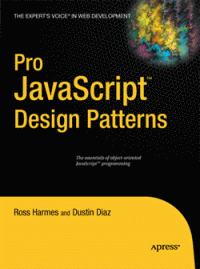
Pro JavaScript Design Patterns

For a while I’ve been meaning to read a book on design patterns, which are ways to design and structure solutions to common problems in order to create efficient and optimal results. I missed a chance to take a course on them back in college when I took Cryptology instead, and have since been meaning to sit down and read up on what’s been developed and what can be useful to me. So it was to my happy surprise when I stumbled across Pro JavaScript Design Patterns in the book store a while back.

The book is broken into two parts. The first part explains how object oriented programming concepts work in JavaScript and how to implement the ones that aren’t built into the language, such as interfaces and private members. The second part of the book focuses on a common set of design patterns and how they can be implemented in JavaScript. It covers the following patterns, giving a chapter on each one: Singleton, Factory, Bridge, Composite, Facade, Adapter, Decorator, Flyweight, Proxy, Observer, Command and Chain of Responsibility.

Before I go any further, while I’m going to write a mostly positive review for this book, I should say that I initially tried to read it around 18 months ago, but stopped after I finished the first section. I re-read it from start to finish about 2 months ago. I stopped the first time I tried to read it because the book introduces a lot of ideas and I was a little confused on some of the concepts it touched on. Specifically, I was confused with how constructor functions worked and how a function’s prototype property worked. I got distracted trying to understand this and picked up another book and ended up not coming back to this book (it’s hard for me to get back into a book once I’ve set it down for a while). As for constructor functions and the prototype property, a good explanation of them can be found here.

I had better luck on my second read through and found the second half of the book to be an easy read. Though each chapter focuses on a different design pattern, some of them use patterns introduced in earlier chapters, so it’s actually a good idea to read the chapters in order. Each of these chapters starts by explaining the basic idea behind the pattern and then goes into a couple of real world examples of how the pattern is used. The chapters close by discussing the benefits and drawbacks of the pattern they introduced and some advice is given to help you identify situations where using the pattern would be a good idea.

Overall, I found this be to be extremely interesting. I could possibly have learned about the different design patterns by reading online tutorials, but being able to look at solutions in JavaScript was very helpful. Also, after reading certain chapters, I felt like going back and rewriting some of my old apps (though I’ll contain myself). Knowing about this collection of design patterns is a huge plus for me and for that alone I’m glad I read this book. I wouldn’t recommend this book to someone who doesn’t have a good understanding of prototypal inheritance, but if you feel like you do, this book is worth checking out. If you don’t, I would recommend looking up some design pattern tutorials online and trying to learn about the common patterns, you’ll be glad you did.

On a side note, I was also amazed at how many of these patterns I’d seen before. It certainly gave me a better appreciation for some of the code bases I’ve seen in the past. I also found that I used some of the patterns already unknowingly, but that I didn’t have a name for the technique I was using.

If I could go back in time I would still probably take that Cryptology class, but I would also try and read up on Design Patterns too. If you have a few extra minutes, it’s worth reading up on them.