Finding and fixing JavaScript errors that no one tells you about

Earlier this month I saw an interesting article on logging client side JavaScript errors, and then another one that showed how to do it using Google Analytics. The idea was clever and easy to implement, so I decided to try out the Google Analytics version when I posted up my new Keyboard Layout Analyzer last week. When an error occurred, I’d log the file it happened in, the line number it happened on, the browser’s user agent string, and the error message itself. Below you can see a screen shot of the error log after 1 week.
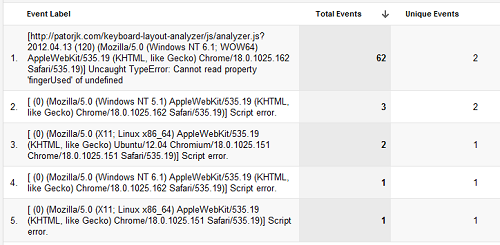
Google Analytics Panel

I’m unsure what errors 2-5 are. There’s no associated file, and the error message is simply “Script error”. The Analyzer gets an average of 90 visitors a day, so these account for a small percentage of users, though it is a little peculiar. Error 1 is definitely a real error though. I had been checking the stats every day, so when it popped up I actually got a little excited.

Usually when I discover an error, it stings. Users don’t often tell you about errors, unless they really like the app or are feeling unusually nice. Often times they may not even know something’s wrong. If the app wont work correctly, they just move on to another page without another thought.

This time, I caught it right after it happened, so I was actually a little happy. The error was pretty easy to pinpoint. Luckily it only occurred if AltGr keys were used, which doesn’t effect users unless they decide to add customizations for foreign layouts, which is why it didn’t show up until later in the week. I should have caught this while testing, but over sights are made sometimes.

So far I’m happy with this little experiment, and am thinking about possibly adding client side error logging to my other apps. For now the only draw backs I see are that this method of discovering errors can be a hassle if your scripts are minified and concatenated, and that users could abuse this if they knew you were doing it (though then again, they could abuse any kind of data saving request you were doing).

Keyboard Layout Analzer 2.0

On Sunday I uploaded the new version of the Keyboard Layout Analyzer. It has a plethora of new features and charts, and a new layout design. My goal was to create something that was more useful and easier on the eye.

Several key features are currently missing from the app (saving/loading of layouts, heatmap stats, etc), and I hope to have those finished within the next week or two. I’ll do a second post, when version 2.1 is released, to chronicle those features. I decided to launch the new app before I had finished everything because I was worried my to-do list would get too large, and I’d simply just never finish before moving onto another project (I have quite a few unfinished projects). Work is also about to get a little hectic in two weeks, so I figured it was best to launch while I had some extra time on my hands. Below is a list of what’s new in the app.

  • Resigned layout.
  • Code rewritten from scratch (mostly because I just wanted to start fresh).
  • New configuration keyboard that allows you to set finger placement, finger start positions, and modifier characters for each key. Also supports drag and drop for ease of use.
  • Drop down for loading sample texts (hopefully more to come soon).
  • Bar charts comparing fingers are now available for distance and finger usage. For row usage, a row usage bar chart is presented.
  • Distance traveled is now broken down by finger.
  • Distance, finger usage, and row usage are displayed by a selectable unit type (percent, key strokes, etc).
  • Stats on consecutive finger and hand usage have been added in.
  • An adjustable number of layouts can be compared.
  • New algorithm for determining the best layout.

Many of the new features are user driven. I received around 8 emails, and they were all extremely helpful in guiding the direction the app took – so thank you to everyone who gave feedback (even if I didn’t implement every idea – yet at least). Hopefully in another week or two I’ll do another update chronicling the remaining features.

Lastly, I had a request to keep the original version intact and available, and have decided to make it available here. If you use IE8 or below, you’ll automatically be redirected there anyway.