Home

URL Structure Changes And Future Plans

Posted by patorjk | General News | Saturday 28 February 2009 4:58 am

One of the things I thought I had gotten right when I relaunched this site was URL structure. I thought I’d put all of my web apps in one sub-folder, all my programming stuff in another sub-folder, common libraries in another sub-folder, etc. However, since then I’ve realized my URL structure wasn’t that optimal. A lot of the sub-folders just made the URLs longer and the mashing together of words made a lot of the URLs hard to read. Examples:

http://patorjk.com/blogstylometrytool/

http://patorjk.com/colorfader/

http://patorjk.com/keyboardlayoutgenerator/

http://patorjk.com/software/gradientimage/

http://patorjk.com/software/colorpalettegenerator/

http://patorjk.com/typingspeedtest/

So, to pretty things up a bit, I’ve decided to change how I’m structuring URLs. My new rule of thumb will be to separate words with hyphens and to only use sub-folders when absolutely necessary. Since domain names are supposed to be compact, I think it makes sense not to include them in my hyphen rule. The new locations of the tools talked about above are:

http://patorjk.com/blog-stylometry-tool/

http://patorjk.com/text-color-fader/

http://patorjk.com/keyboard-layout-generator/

http://patorjk.com/gradient-image-generator/

http://patorjk.com/color-palette-generator/

http://patorjk.com/typing-speed-test/

This seems like a rather superfluous change, but it was just one of those little things that was bothering me. I don’t plan to move anything else unless I make a major update to it, and all of the old links are 301 re-directed.

The one program I didn’t move was the Text Ascii Art Generator. This is because it has a bunch of links pointing to it and I didn’t want to mess up its standing in the search engines.

As for my current future plans, I hope to improve some of my existing web-apps. Unfortunately I was kind of tight on time this past week (I had to work past 9PM three times, I’ve got a lot to do at work), but I did do some mock-up Ext JS layouts for the Typing Speed Test program. However, after a little bit of thought, I think I’ve decided I’m just going to extend and change the one I currently have written. I hope to have a new version of it out within the next two weeks. After that, I’m going to try and refurbish another one of my apps.

Lastly, if anyone has any problems with accessing programs using the new URL structure (via old links or whatever), please let me know.


“Learning Ext JS” Book Review

Posted by patorjk | Book Reviews, JavaScript | Wednesday 18 February 2009 2:18 am

Learning Ext JS

Learning Ext JS's Book Cover

This will probably be my last book review for a while. In December I said I wanted to do some more reading up on JavaScript and I think I’ve satisfied that itch. I’ve read 3 and a half books on the topic since then and I think I’ve gained a good amount of knowledge on the language and some of its various frameworks.

This latest book was sent to me by Packt Publishing (in exchange for a review giving my opinion on the book) and covered the Ext JS framework. Its name is Learning Ext JS and its authors are Shea Frederick, Colin Ramsay, and Steve ‘Cutter’ Blades.

Ext JS is a JavaScript framework that’s known for the eye catching user interfaces that it helps you create. It’s geared toward web application development and it was originally written as an extension to the Yahoo User Interface (YUI) library. Unlike many of the other JavaScript frameworks which are offered under permissive licenses, Ext JS is only available via the GPL, a reseller license, or a commerial license.

Learning Ext JS is a good book and I enjoyed reading it. It has a similar set up to the other Packt Publishing book I read on Dojo, however, Shea and company take a little more time to explain things, which results in a longer but better quality book. I especially liked the first few chapters since the examples were easy to follow and involved a little humor. I also liked how a lot of attention was given to grid widgets (two whole chapters). This is an especially useful widget and it’s not usually obvious how to use or set them up.

As for the flow of the book, it starts off by showing you how to get Ext JS up and running and then it walks you through a small, mostly dialog-based application. After the sample app, the book proceeds with chapters that cover a particular area of the framework – Forms, Buttons/Menus/Toolbars, Grids, Layouts, Trees, Windows and Dialogs, Effects, Drag and Drop, and Data. The last two chapters of the book are on extending the framework and on some odds and ends of the framework (like various widgets created by community members).

The book is aimed web application developers who are familiar with HTML but who may not have any experience with JavaScript. However, even though the authors hold your hand through the early chapters and give an explanation of Object-Oriented Programming in one of the later chapters, this book should really only be read by people who are familiar with JavaScript. I can’t see someone without any JavaScript experience being able to tackle a framework like this.

So if you don’t have much experience with JavaScript, I’d probably pick up a book on plain old JavaScript first. However, if you’re interested in a book on Ext JS and have some JavaScript experience, I’d recommend this book. It provides a good introduction to the framework and takes you through many of its different areas.

Also, for those of you interested in a sample chapter, Packt has Chapter 7: Layouts of the book online in pdf format. Personally I think letting a user read the first and second chapter would be much more useful, but a sample chapter is better than no sample chapter.

Generating T-Shirts?

Posted by patorjk | Random Ideas | Wednesday 11 February 2009 2:41 am

About a month ago I had an interesting idea for my Text Ascii Art Generator (TAAG) program. Though due to being busy with work and buying a house, I haven’t had time to try it out. However, the idea is applicable to almost any web service, so I thought I’d share it with you all in case someone out there was looking for a nifty way to make some extra money off of a web app or blog without posting a bunch of ads up. I’m aware that too much commercialism can kill a website, however, I think this idea is kind of clever.

Hypothetical T-Shirt

Hypothetical T-Shirt

The idea originally struck me when I was brainstorming improvement ideas for TAAG. I thought that it might be cool if the user could put their output on a t-shirt. It’d make for a really neat way for someone to show their techiness/geekiness. After deciding I liked the idea, I then wondered if the t-shirt companies had already thought about 3rd party applications creating dynamic designs for them. After some quick googling, I discovered they had.

Both Zazzle and SpreadShirt allow you to dynamically submit designs for t-shirts which you can then sell. CNN even uses SpreadShirt to sell t-shirts of recent headlines. And you’re not limited to just t-shirts, you can put your designs on all sorts of crazy products – mugs, purses, hats, buttons, mouse pads, shoes, postage stamps, posters – the list goes on.

I’m not advocating turning your web apps or blogs into online stores, but if carefully used, this could compliment their output. An online photomosaic program that would let you buy a poster of your output might be kind of cool. And web comics that would let you buy t-shirts of your favorite comics would probably do pretty well, I had a whole bunch of Far Side t-shirts when I was in middle school.

Though as I said at the start of this post, I haven’t done any of this myself yet. I talked briefly to the FIGlet creators and they were cool with the idea, however, since I didn’t create the fonts themselves I’d feel wrong selling products with other people’s artwork on them without their permission / giving them a cut, and since there are over 300 fonts, this creates a rather complicated situation. So I may not even implement this idea (I’m still thinking about it though), but I figured I’d share the general concept, since it appears it could apply nicely in certain situations.

Looking Into Ext JS

Posted by patorjk | Book Reviews, JavaScript | Tuesday 3 February 2009 2:48 am

Packt Publishing, the same book publishing company that sent me the Dojo book, has offered me another free book in exchange for a review, this time on the JavaScript framework Ext JS. I don’t consider myself an expert book reviewer, however, it sounded like another a great opportunity/excuse to learn something new, so I took them up on it.

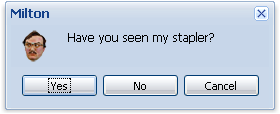
The book is titled Learning Ext JS and is written by Shea Frederick, Steve ‘Cutter’ Blades, and Colin Ramsay. So far I’ve read about 60 pages, and it’s looking like it’s going to be a pretty good book. It’s paced well and the authors seem to have a good sense of humor (they introduce Ext JS message boxes using a character from Office Space), though I still have around 190 pages left, so there’s still a long way to go.

Example Ext JS Message Box

Example Ext JS Message Box

Ext JS doesn’t appear to be too different from other JavaScript frameworks I’ve tried, though its main focus seems to be in creating slick looking web interfaces. It was originally created as an extension to the Yahoo User Interface (YUI) library, however, due to its popularity, it ended up growing into a stand alone JavaScript framework. Since it was developed with YUI in mind, it initially required YUI to be present to do the behind the scenes work. This changed over time, first with adapters being written so other frameworks (like jQuery and Prototype) could be used to do the core functionality, and then later so that Ext JS came as a complete, stand alone product. Though during this last phase they did keep the hooks in so that you could still use an adapter and have another framework to do the behind the scenes work if you wanted.

From what I’ve seen of Ext JS so far, it’s looks pretty impressive. The offical
Feed Reader and Web Desktop sample apps look especially cool. The only negative I can see, which was initially pointed out to me by Sloat, is that license for the library is the GPL. This means that apps you write using it would be under the GPL and you would have to release the code for them under the GPL. You can avoid doing this by purchasing a commercial license, though this would cost you between $289 and $18,699, depending on the license and support options you picked.

Knowing this, I probably wouldn’t write any large applications using Ext JS, unless I planned to purchased a license. However, for most of the stuff I write, I don’t mind the source code being available, so having to use the GPL is annoying but not a deal breaker. This is something you should think about before you decide to use the Ext JS library though, because this license requires that you release your source code under the GPL.

Anyway, hopefully this experience will lead me to learning a couple of new tricks and being able to create some nicer looking apps. Instead of waiting until I finish the book to do any kind of in depth work with the framework, I think I’m going to try and be a little more interactive this time and write stuff as I go. That way I don’t end up ignoring this site.