Category Archives: General News

General information about patorjk.com or Patrick.

Five Miscellaneous Updates

I’ve done a handful of updates the past few months and I realized I should probably document them somewhere, as people interested in this site aren’t going to periodically comb through the whole thing to see what’s new. So without further ado, here’s what’s new.

Text to ASCII Art Generator

For TAAG, I had a user request the ability to copy TheDraw output as bash commands so that the text could be used in bash scripts. I thought that was a great idea and added it to the app.

I also made some UX adjustments for mobile, as previously the app wasn’t very usable on mobile.

Arial ASCII Art Gallery

The Arial ASCII Art Gallery now has 1,500 different pieces. The sheer quantity of what’s in there is starting to rival some of the normal ASCII art archives out there, and I would say the quality of what’s in the Arial ASCII Art Gallery is pretty high. The biggest problem now is discover-ability.

A handful of pieces from the gallery

However, I’m not completely done populating the gallery, I’ve been holding off on talking about this until I’m done, but essentially I used Claude to help me create a script to analyze 1000’s of old AOL progs to extract out what might be ASCII art. Most of what was extracted was random characters, but there’s a lot of cool art that got pulled out too.

So I’ve been going through files and if the extracted data is in fact a piece of ASCII art, I add it to the gallery and note the artist’s name. The process has been slower than I expected, but I don’t think a lot of this stuff has seen the light of day in decades.

Anyway, I still need to finish going through the output, then I want to redesign the app, and then I want to improve discover-ability. Once I’m done all of that I’ll do a full write-up here. In the meantime you can check out the app to see the current progress. I periodically update it, and you can tell when this happens because the count at the top will update.

Snake

I’ve updated my Snake game to use TuiCss for its dialog boxes. TuiCss is a UI library for creating MS-DOS-like interfaces. I’ve been meaning to do this for a while, but at the same time I’ve been really hesitant, since the game has had the same look and feel for 18 years. However, this game is mostly here to remind me of my high school days when I would goof off. It’s just a fun little nostalgia trip, so I figured the update made sense. Earlier this year I also updated it to work on mobile.

Image Glitcher

I’ve made some quality of life updates to Image Glitcher. You can now load any type of file into the hex editor, and a number of other small updates have been made. I want to re-visit this app later to support other file types, but I’ll circle back to that later.

Monster Eyes / Main Page

Back in 2022 I made a silly Halloween themed react library, full of Halloween decorations for websites. One of the components was a set of eyes that watched the cursor as it moved around the screen. I thought it would be fun to dust those off and place them around the main site. I’ve set it up so that if you’re in dark mode, as you scroll down the page all of these eyes will open and start watching you.

It amuses me, though I have no idea what actual visitors think.
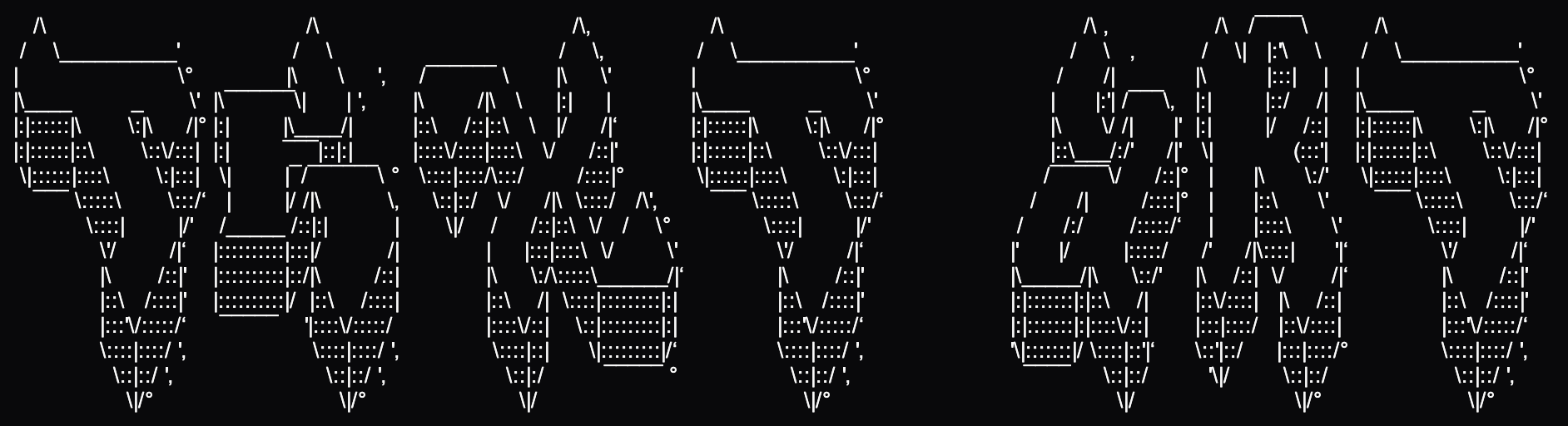
Adding TheDraw Fonts to TAAG

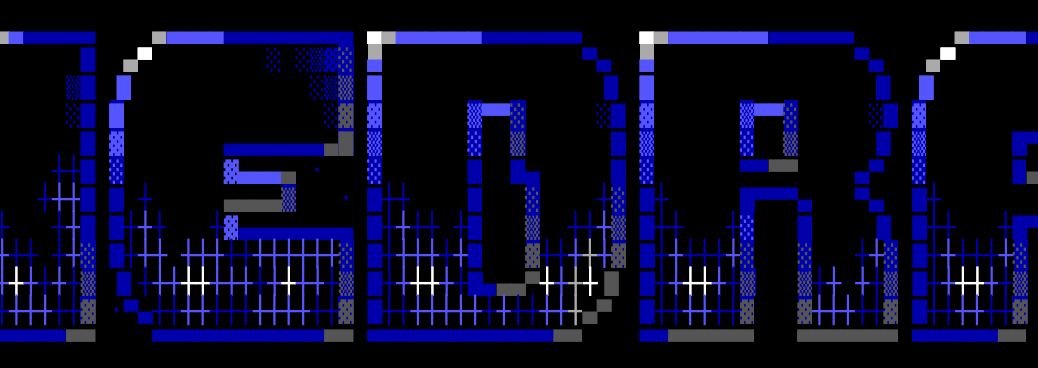
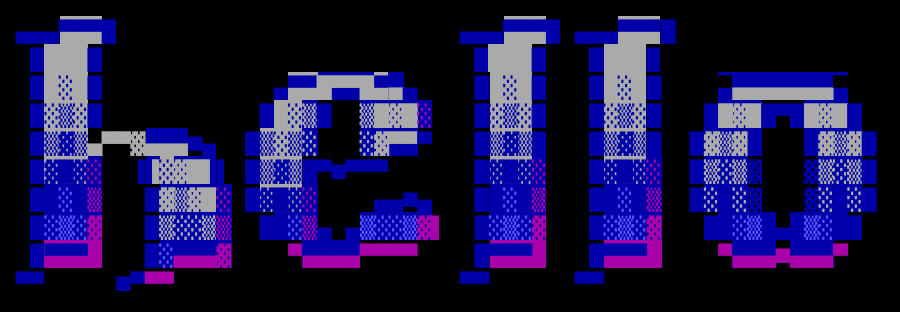
TAAG now has full support for TheDraw font files, color and all.

A little over 12 years ago, someone sent me a zip of old ANSI art fonts. I converted a handful of them to FIGlet fonts (basically the ones that didn’t use color), and added them into TAAG. I have always wanted to revisit the format though, as there were so many fonts created for it, and earlier this year I decided to go back and properly add support for it. 

TheDraw?

TheDraw was a 1980s DOS app for creating ANSI art. You can think of ANSI art as ASCII art’s more handsome sibling: an extended 256-character set instead of ASCII’s 128, along with 16 colors. Though nowadays ASCII art is made with unicode and text can be colored however you want, so these benefits are moot. But back in the days these benefits distinguished it from ASCII art. Artists made ANSI art fonts in the 80’s in the same way they would later make ASCII art fonts for FIGlet in the 90’s and on into today.

TheDraw’s font format had the advantage of color and more characters, but it was less sophisticated, and it lacked features such as kerning. It also had hard limits in certain areas. For example, fonts couldn’t be larger than 12 characters high. I would argue FIGlet’s format is better, but I do really like the color and art style of TheDraw’s fonts.

The TAAG update

I silently made the first update for this several months ago, adding the new fonts to the drop-down list but not to the Test All page. Then in May I added them to the Test All page. I haven’t heard a peep from people who use the app, but hopefully these new fonts provide some enjoyment.

I know it seems really late for me to do a write-up on this, and I’d meant to post a blog or make a video sooner, but life has been crazy (though then again, when is life not crazy?). Additionally, videos kind of need a story, and I couldn’t figure out how to frame this one.

Also updated

The AOL macro fonts in TAAG are fixed. You can now see them again in their full ’90s glory. That’s a longer story for another day though.

Also, the Arial ASCII Art Gallery has gotten some major updates and will be getting more in the near future, but again, a story for another time.

patorjk.com Overhaul: Phase 1

After recently redoing my Arial ASCII Art Gallery and TAAG app, I’ve decided to keep the momentum going and refurbish other areas of this site. For various reasons (young kids, work, photography, other commitments), I’ve let this site languish over the last several years. While it’s interesting as a time capsule, I’d prefer to have something up that people actually find useful. Here’s what I’ve been working on:

Main Page

I’ve created a new main page. If you’re on desktop you’ll see the spotlight effect from my react-halloween library, but otherwise it’s just a simple directory listing of the main content on this site. The previous main page wasn’t bad, but I wanted something cleaner looking that I could expand upon later with fun ideas (like the spotlight effect).

Color Palette Generator

The Color Palette Generator has undergone a makeover. This was one of the oldest apps on the site. It allows you to generate a color palette from an image, which can be useful when designing a website or creating artwork.

I wrote the app in 2008, then updated it in 2010 to add the “Muller Colors” palette option. There are now countless apps on the internet like this, but I was partial towards mine ever since a rug website reached out years ago to get access to the underlying algorithm. Apparently they had tested many palette generators, and my algorithm worked best for their rugs.

The app was in desperate need of a makeover, so I’ve modernized its design. I’m unsure how much more work to put into this since there are now so many similar apps, but I may add some additional palette generation algorithms in the future.

Chain Letter Archive

I’m a collector of things, and in the 90’s I started a chain letter collection. A handful of the funny ones made their way to this website, but their organization was never very clear and their format was unsuitable for mobile devices. So I made a dedicated page that explains what they are and why they’re here. I also reformatted them so they can easily be read on small screens.

The HTML of some of these letters was copied directly from AOL emails, so it was full of mismatched and deprecated tags (like FONT). Clean-up was a daunting task, so for three of the letters I decided to use AI to clean up the HTML and put them in a more responsive format. Surprisingly, the AI didn’t like the content of these emails. In some cases it even refused to translate them, and in others it censored or rewrote the jokes. It was kind of fascinating.

As an aside, I’ve debated removing these letters from the site since they’re a little embarrassing. I was a teen when I collected them, and the humor is pretty juvenile. But chain letters were a part of the early internet—I think they were the first kind of content to go viral—and they’ve basically disappeared from the web. I don’t think the ones I have collected here are available anywhere else. At the very least, they’re an interesting time capsule showing what viral content looked like 30 years ago.

Facebook Like Buttons

I went through a phase 10-15 years ago where I was putting “like” and “share” buttons from third-party sites like Facebook on pieces of content. Kind of hilariously, I discovered that the Facebook Like buttons on this site displayed a like count but no longer worked. Somewhere along the line they became frozen in time, I’m guessing they required a code update or something. Whatever the case, I removed them. I did leave the X/Twitter buttons since they still work and appear to be occasionally used. I may eventually remove those too though, as third-party APIs inevitably break.

What’s Next?

I plan to update some of the older and lesser-viewed sections on this site. There’s definitely content that needs a facelift. I’ll probably avoid updating stuff that gets decent traffic though, since I don’t want to mess with something people are actively using and create unnecessary angst.

If you’ve got suggestions for improvements or notice anything broken, feel free to reach out. In the meantime, check out the updates and let me know what you think!

Adventures in Photography

It’s been a little quiet around here, but I haven’t forgotten about this place.

Around the start of October I started getting into photography. I had received a Nikon 5300 DSLR camera for Christmas last year, but it spent most of the year collecting dust. However, when the Autumn leaves started falling, I realized it was the perfect time to finally learn how to use the thing.

The Contest

Near the end of October I came across a newspaper article that detailed an amateur photography contest that Kinder Farm Park was holding. The park is run by the county and is 288 acres of forested areas, playgrounds, fields, and farm buildings. Upon finishing the article two thoughts were left running through my mind: I hadn’t realized large scale county parks were a thing, and there were only 3 days left until the competition was over – I needed to find this place and take some pictures.

I ended up making it to the park the day before the competition ended and ran around taking photos like a crazy person. Since it was a Thursday evening, I only had about an hour before it got too dark. I liked two of my photos enough to submit them, and to my delight, two weeks after the contest ended I got an email saying I had scored 2nd place in the People category for this pic:

Before I toot my own horn too much, there were only 9 entries in this category, so it’s not that big of a victory. The other 3 categories had 3 times as many entries, and last year there were a lot more entries, so I’m not sure what happened this year. I guess I got kind of lucky. However, I was still pretty thrilled. I even got interviewed by a local paper, which was kind of cool.

November-December

I’ve spent the past two months basically learning the in’s and out’s of photography (at the time of the contest I was taking all of my photos in auto mode). I resurrected my Flickr page, and was surprised to see that it was still a pretty cool place. Before coming back to Flickr, I briefly tried out Google+, and it was certainly very nice, but Google+ still seems like a ghost town. My belief is that it tried to be too many things (that’s a whole other topic though).

Anyway, I’m certainly not going to change this place into a photography site, but I think changing gears and learning about something new will help me bring more to the table when I finally do come back with some new content. This site is not going to go dormant though. I’ve also spent part of this past year as a technical reviewer for a new Packt Publishing book, so I’ve got an entry coming out about that, and there are a few other small things I’ve been working on, so I’ve got stuff in the pipe line for this site.

Photo Map

And lastly, after the Kinder Farm Park contest ended they released a gallery of all of the submissions. Since each pic listed the location where it was shot, I thought it might be fun to place them into a Google Maps map. If you’re bored you can check them out below.

Site Note: Some of these placements are guesses or approximations.

Creating a d3.js Game of Thrones Visualization

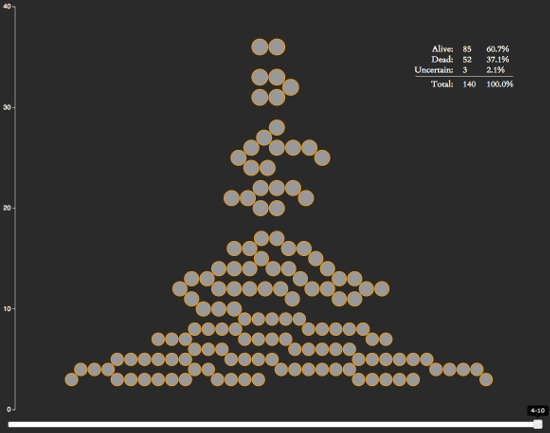
For any Game of Thrones fans out there, I’ve created a neat little interactive visualization. It ranks characters by how many episodes they’ve been in, makes note of who’s alive and who’s dead, and allows you to go backwards in the show’s history to see how things have developed over time.

It also reveals some interesting stats:

  • After 40 episodes, the show has around ~140 notable characters.
  • The show seems to kill an average of 13 notable characters per season, or 1.325 per episode.
  • 37.1% of the notable characters have been killed off so far.

You can see a spoiler-free version of the visualization below (character avatars and death information has been removed):

d3_got

The chart is written on top of d3.js, which is a web-based visualization library. I learned how to use it earlier this year and have been on the lookout for projects I could use it for. After seeing the bubble chart from Matthew Daniels’s Largest Vocabulary in Hip Hop visualization and noticing it was based on an example by Amelia Bellamy-Royds, I decided to see if I could create my own bubble chart.

D3 Context Menus

I didn’t see any d3.js context menu plugins while doing this project, so I wrote my own. I could have used a jQuery plugin, but I wanted to keep as much of the code within the D3 way as possible (it just made working within their event structure easier).

Other Game of Thrones Visualizations

So there’s are plenty of other Game of Thrones visualizations out there. If you’re looking for more, I’ve compiled a short list below of some of the best ones I’ve found.

  • Events in the Game of Thrones – A visualization of the events from the first 5 Game of Thrones books.
  • Game of Thrones Map – Interactive map of the Game of Thrones universe.
  • Beautiful Death – A piece of artwork drawn for each episode in the show. I’m not sure if this technically counts as a visualization, but they’re pretty cool.

The Years We Spend on YouTube

I read an interesting fact the other day. It stated that if you added up all of the views of Psy’s Gangnam Style, it would equate to over 13,000 years of human viewing time. I thought it was a pretty trippy concept, and since I’d sort of been looking for a reason to play with YouTube’s API, I thought it might be kind of cool to make a quick app around the idea.

You can see it in action here – Years Spent Watching YouTube.

Let me know if you have any suggestions for example videos.

Keyboard Layout Analyzer 3.0 Beta Release

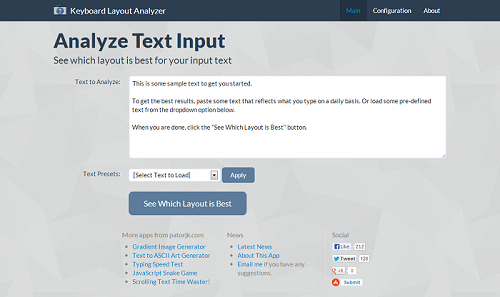
I’m not completely done, there are still a hand full of new features I want to add, but I have a feeling that if I put off the update any longer, it’s never going to get posted up. So today I’m releasing the newest version of my Keyboard Layout Analyzer (KLA), which I’m dubbing version 3.0, since it’s the 3rd overhaul of the layout.

kla

New features:

  • Analysis results can be shared.
  • Charts are interactive / contain hover effects.
  • There are more “Display” options in the various results sections.
  • You can turn on/off certain keyboard data in the individual results sections.
  • The heatmap uses a more realistic heatmap visualization, has a table of key stats, and I’ve re-added in the mouse over effect (the biggest complaint in my previous version was that I took this out).
  • Miscellaneous section has charts for each piece of data.
  • Layouts you create can be submitted.

The biggest change though is the UI. The main reason I created this version was because I thought it would be a fun project to get better familiar with AngularJS. MV* JavaScript libraries like Angular have taken off recently because they make maintaining, updating and reusing front-end code easier. I felt the code I wrote for version 2.0 of KLA got a little spaghetti-ish at points, so this really appealed to me.

To keep things short, I’ll go ahead and just cut to the chase: Angular lived up to its hype. It was great at giving structure to the app. The new KLA code base feels a lot more sane and the HTML is easy to follow. If you do front-end development, I’d highly recommend you try Angular out. If you need a starting point, egghead.io has some great tutorial videos and Dan Wahlin has a really nice AngularJS Fundamentals video. And as a side note, even though Angular’s official documentation is good, I wouldn’t start there. I found it to be somewhat cryptic when I first started out. It’s a good reference point after you’ve gotten your feet wet though.

The only negative I came across with Angular was that it had a steep learning curve. I ended up having to back track a few times and re-do sections of the app because I didn’t do them the “Angular way”. Angular forces you re-think how to do certain actions and it uses some strange terminology, but once you get past all of that, it’s a pretty powerful tool.

Removing JK.js

My early days in JavaScript reminded me of an old puzzle game called The 7th Guest. In The 7th Guest, if you had trouble solving one of the puzzles, you could ask for a hint from the library. After getting 3 hints, the puzzle would be solved for you, but you’d miss the video that was shown after completing the puzzle, therefore missing a part of the game’s story. If you missed too many videos, you’d have no idea what was going on.

When I first started learning JavaScript, I kind of felt this way about third party libraries. I didn’t mind using ones that provided UI components, but I felt I’d be missing out on something if I used jQuery. So I wrote my own jQuery-like utility library called JK.js, which I used in my personal projects. However, I no longer feel like I’d be missing out on anything by implementing low level utility functions. What I really care about is writing an app, not a library. So as I’ve been refactoring my projects, I’ve been removing JK.js and replacing it with jQuery.

Flatly

Bootstrap makes it easy to create nice looking web pages. I decided to use an awesome Bootstrap theme someone created called Flatly, though I tweaked the colors a little bit. I also used an image from subtlepatterns.com as the background to make it feel a little livelier. However, while Flat is cool looking, I worry the result may be a little too flat, so at some point I may backtrack.

jqPlot

The charts in my previous KLA versions used a modified version of PlotKit. PlotKit was a good library, but it hasn’t been maintained in years. On top of that, my modifications to it used my own JS library JK.js, which I wanted to weed out, so I knew I needed a new chart library if I was to redesign this app. I decided upon jqPlot since it was jQuery-based and had a lot of great functionality. So far I’m pretty happy with it.

Heatmaps

I came across a neat visualization library for heatmaps, so I decided to use that over the simple key-color heat maps I was creating before. Interestingly, the author of this library also has his own keyboard heatmap app. When I saw this I felt a little weird about using the library – but since the heatmap library was its own separate component, I figured it wouldn’t be too weird if I used it too.

Future Updates

I still a have more features I want to add, ones that will be more stat based, so hopefully there’ll be another update in the next 2 weeks or so. I also may update my Typing Speed Test to use this same type of layout (it’s in dire need of an update). If you have any feature requests let me know. Special thanks go out to Wayne D. for submitting a bunch of awesome ideas and feed back!

Random updates for June

I feel like I work on this site a lot, but hardly ever post anything. Some of that may be due to me starting projects and then never finishing them though :P. Below is a collection of random thoughts and updates related to the site.

Gradient Image Generator

I’ve updated the Gradient Image Generator app and added support for CSS3. This update is in the style of what I was doing in my last post. I was going to do a “part 2” post, but I changed how I was updating apps when I got to the Keyboard Layout Analyzer.

Keyboard Layout Analyzer Overhaul

I’m currently overhauling the Keyboard Layout Analyzer. This was long overdue since the chart library it uses, Plotkit, is long dead (in terms of active development), as is Mochikit, the JS library Plotkit uses. The new front-end will be powered by AngularJS and use jqPlot for its charts. I tried to find a place for xkcd charts, but couldn’t come up with anything that didn’t seem totally out of place. I’ll go into more detail on the new front-end when its finally up, and I’m open to feature suggestions if anyone has any.

TAAG

I added support for MySQL comments in TAAG. I also removed its offline web app capability. Offline web apps seem to confuse users, and I’ve noticed downloading errors in Chrome while using it on my iMac. This seems to happen randomly and because there are lots of files that need to be cached, and it doesn’t seem to be repeatable. With the appcache API being in disarray, and after running into bugs in Chrome and FireFox, I’ve lost my enthusiasm for this particular web browser feature.

iMac

I’ve forsaken my Microsoft roots and purchased a souped-up, 27 inch iMac. I wasn’t a fan of Windows 8, the wires from my PC were making me nuts, and I thought it might be interesting to switch things up. I’ve only had the computer for a few months, but so far I’m pretty impressed. The big screen is amazing, I love being able to use terminals, updating software with brew is nice, and I’m a big fan of the magic mouse. The only downside so far has been that I can’t run Internet Explorer. I’m not sure how Mac users did web development 5 years ago…

Google Authorship

I feel like I’m the last person to know about this, but figured I’d mention it here anyway. Have you noticed people’s faces showing up next to certain search results? Apparently it’s called Google Authorship, and it’ll let you stick your picture next to webpages that you author. It only seems useful for blogs and news articles, but it’s kind of neat.

Spam Comments

When I get a blog comment that I think is spam, I google it to see if its been posted elsewhere. Usually my gut is right, and I see the comment posted on a dozen or so other blogs. Recently though, I came across a spam bot that had messed up and posted this:

{
{I have|I've} been {surfing|browsing} online more than {three|3|2|4} hours today, yet I never found any interesting article like yours. {It's|It is} pretty worth enough for
me. {In my opinion|Personally|In my view}, if
all {webmasters|site owners|website owners|web owners} and bloggers made good content
as you did, the {internet|net|web} will be {much more|a lot more} useful than ever before.
|
I {couldn't|could not} {resist|refrain from} commenting. {Very well|Perfectly|Well|Exceptionally well} written!|
{I will|I'll} {right away|immediately} {take hold of|grab|clutch|grasp|seize|snatch}
your {rss|rss feed} as I {can not|can't} {in finding|find|to find} your {email|e-mail} subscription {link|hyperlink} or {newsletter|e-newsletter} service. Do {you have|you've} any?
{Please|Kindly} {allow|permit|let} me {realize|recognize|understand|recognise|know} {so that|in order that} I {may just|may|could} subscribe.
...
}

As you can see from its setup, it appears to randomly choose synonyms for many of the words. It also has around 2 dozen comment templates (for the sake of brevity, I’ve only included the first two). I was actually kind of impressed, that’s pretty clever! They knew how people were checking for spam, and adapted to try and get around it. Pretty soon spammers will be using AI to analyze a blog’s content, and then use that information to post a relevant comment or follow-up comment, and bloggers will have no idea that they’re conversing with spambots.

Design Overhaul (part 1)

Like a book being judged by its cover, people tend to judge an app by its UI. Since jumping into a web development job 3 years ago, I’ve done a fair amount of client side work. I’ve helped redesign legacy applications with cool new UIs to lots of praise, even though the new apps had less features. And I’ve seen customers balk at feature-rich products that had so-so interfaces. And it makes sense, people like to use stuff that looks good, and if you can’t be bothered to put work into the design, what does that mean for the rest of the app?

I’m not a designer, and most of the stuff on this site was created before I really knew much about design. So as a result, a lot of what’s here looks pretty meh. After writing my last post, I took a look at the text fader that’s on this site and was kind of embarrised. I decided something needed to be done, so I started going through the various sections of this site and giving the layouts a much needed fresh coat of paint.

Mobile Version

The new designs aren’t amazing by any means, but I think they’re a step up, and hopefully they’ll provide a better user experience. I decided to use Twitter Bootstrap for a lot of the basic look and feel, since it looks great and plays well with jQuery. I’ve also been trying to make the new layouts responsive, so that they also look good on mobile devices.

I’m not allowed to bring a cell phone into work, so until last year, I avoided getting a smart phone. However, now that I have an Android, I use it all the time outside of work, and I’ve realized that I’ve made a big mistake by avoiding mobile development.

So now that the background is out of the way, what has actually been updated so far?

There are several more sections of this site I’m going to overhaul, but figured I’d do a write-up of what’s been done so far. I’ll also probably go back an revisit some of the sections I’ve already done if I get some better ideas. If you have any suggestions for anything just let me know.

The Chrome Web Store Effect

It’s been about 5 months since I tried out Chrome’s Web Store for my Snake and Text to ASCII Art apps, and I figured I’d give an update on how putting them in Chrome’s Web Store has effected their usage.

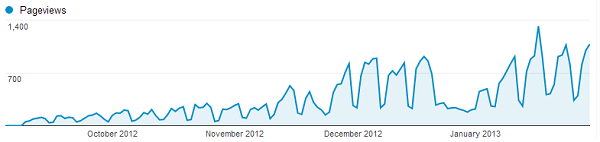
My Snake game has sat around for about 4 years on this site, consistently getting an average of around 30-50 users a day. I originally wrote the game as a nostalgic tribute to my high school days, and it’s only undergone a hand full of updates since its initial inception. Since this site was getting around 6.5k visits a day, 50 visitors means the app was accounting for around 0.077% of the site’s total traffic. After placing the app in Chrome’s Web Store, the daily usage began to steady rise, and the app has recently been getting between 900-1,000 visitors a day on the weekdays:

Snake Stats

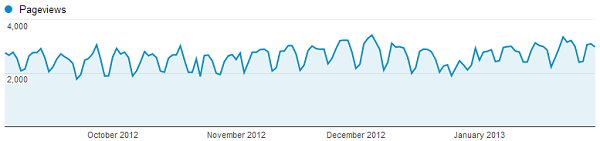
Holy crap, the Chrome Web Store is awesome! Even with the bagillion other Snake games listed in the store, traffic has gone through the roof, with daily usage up 2,000%! But what about the TAAG app, has it also seen such a meteoric rise in traffic? Interestingly, even though both the Snake app and TAAG app have a similar number of installs, TAAG hasn’t seen a noticeable rise in traffic:

TAAG Stats

Hrm, this is kind of interesting. My guess is that this discrepancy is caused by the following factors:

  • TAAG is a utility app and isn’t really something that’s used often.
  • There is a high volume of people trying out games in the Web Store (installing them, and then uninstalling them if they don’t like it).

It’s hard to be certain of what’s actually going on, but I found these results to be pretty interesting, so I figured I’d share. I had wondered if the Chrome Web Store would be a positive for web app developers, and so far, from my limited experience, it seems like could potentially be a big plus for web app developers, especially game developers.