Category Archives: General News

General information about patorjk.com or Patrick.

2012 Comes to a Close

I’ve had a lot of false starts with writing posts lately. Writers blocks seems to have gotten the best of me, but I figured I’d do a post to reflect on the past 12 months.

This year I turned 30, which makes me feel a little strange. I’m no longer the young guy. Up until 2 years ago I was always the youngest guy on the team I worked on at work, now I’m the oldest guy (though in fairness, the team I’m currently on is only 3 people).

The hand of a fellow runner. Photo By fejsez

I also became a dad this year (2012-12-09), which is pretty cool. I wont bore you with any mushy revelations or talk about how it’s changed me – I honestly still feel like the same person. However, it is amazing to look over at the little guy and know that he’s got half my DNA. It’s also fun to wonder what kind of person he’ll be. Hopefully I can steer him in the right direction and help him become the best person that he can be.

PHP

I learned a lot about web development this year. Both on my own, by experimenting with new HTML5 APIs and browser tools, and at work. To speak in general terms, at work I’m a developer on two web applications – one based in Java Spring and one based in PHP. Working with the two side by side, I’ve slowly grown to hate Java web development – it’s slow for iterating changes, lends itself to gigantic class hierarchies, and seems to make trivial tasks harder than they should be. Even though it has its flaws, PHP is actually pretty fun to develop in. It also has great documentation and it seems like there is a blog post or forum question on anything you’d possibly want to do with it.

I still prefer the front-end though, and I’m still not sure I want to rely on PHP every time I do something on the back-end. One of my goals for next year is to take a serious look at Node.js, Python, and Ruby, and to do a for-fun project in each. I’ve actually started this already, but got a little side tracked when the baby showed up.

Internet Archive Fund Raiser

The Internet Archive is doing a donation drive with a 3-to-1 match. The archive was of great help to this site a few years ago when I underwent the one-two punch of my hard drive crashing and then my old web host deleting my site. Thanks to their Way Back Machine, I was able to recover a lot of files (in fact, it’s the reason the VB sections to this site are still up). I threw a couple of bucks their way out of appreciation, and I figured I’d pass on the link to anyone else who was interested in helping them out. They’re almost at their goal of raising 150k.

Notes on Offline Web Storage for TAAG

After you’ve visited it at least once, the Text to ASCII Art Generator (TAAG) will now work even when you don’t have an internet connection. I had a user request this, so I figured I’d add it in for them and anyone else out there who may want to use the app offline.

Offline web applications are one of the new capabilities being introduced with HTML5. An offline web application has its files downloaded and permanently installed in a web browser’s application cache. This allows users to go to an app’s URL and have it work even when they aren’t online. It’s a smart idea, but it has some interesting pros and cons. In this entry I’ll detail what I did to set TAAG up to work offline, detail some issues I ran into, and provide some notes for anyone looking create an offline app.

The first step in creating an offline web application is to create a manifest file which tells the browser which files it should store in its application cache, which files should try getting from the network, and if offline, which files it should use in place of certain standard files. Any HTML files that reference this manifest will be implicitly added to the CACHE section of the manifest and after a user’s first visit, all cached data will come from the application cache, even if a user F5’s the page. The application cache is only ever updated when the manifest file is updated, and even then, it will take 2 visits for a user to see any updates. This is because when a user visits the app’s URL, the application will be read from the cache, it will then see the manifest has been updated, and it will then update the application cache for the user’s next visit. These idiosyncrasies are a bit to take in, but once you know what’s going on its not that bad. Here’s what a sample manifest file would look like:

CACHE MANIFEST
# This is a comment.
# The cache is only ever refreshed when changed.
# Last updated: 2012.08.18

# The CACHE section indicates what we want cached.
# The HTML file linking to this manifest to auto-added to this list.
CACHE:
one.jpg
two.jpg
jquery.js?12345

# The NETWORK section indicates which non-cached files should be 
# obtained from the network. This will almost always be "*".
NETWORK:
*

# The fallback section allows us to setup "fallback" pages to use 
# when offline.
FALLBACK:
page2.htm page2-is-offline.htm

An HTML file linking to this manifest might look like this:

<html manifest="my.appcache">
<head><title>Test</title><meta charset="utf-8"></head>
<body>
<div>Some text</div>
<img src="one.jpg"/>
<img src="two.jpg"/>
<script src="jquery.js?12345"></script>
</body>
</html>

And one last gotcha – to keep the manifest file from being cached by the browser, and to ensure the manifest is served with the correct mime type (an incorrect mime type will keep the manifest from being recognized), we need to update the web server’s configuration. For Apache, we’d add the following rules to our .htaccess file:

AddType text/cache-manifest .appcache

<Files *.appcache>
    ExpiresActive On
    ExpiresDefault "access"
</Files>

That should do it! With this technique your users will now be able to use your apps even when they don’t have an internet connection. I find this cool because it makes web apps more useful and puts them a step closer to supplanting Desktop apps. However, there are unfortunately a number of issues that have held offline web apps back, and they’re worth mentioning.

Issues with application caching

A lot of people aren’t happy with how application caching currently works. The W3C has set up a working group that’s discussing possible improvements, though hopefully the main components of the current spec will continue to work. However, I also feel like they need to make some changes too. Below I’ll list my biggest concerns.

  • How would users know that certain URLs still work when they’re offline?

    I don’t understand how this isn’t the most important issue for offline applications. Without someone manually telling you that you can use a particular application while offline, I don’t see how someone would think they could browse to example.com/webapp and expect it to work when they didn’t have an internet connection. In their current form, I only see offline applications as useful to techies or people in the know.

    It’d be nice if offline applications could provide an icon, name, and description, and then browsers could show users which offline applications they had installed. It could be argued that this is a browser feature, but bookmarks are a browser feature too, and all browsers allow webpages to provide a favicon for bookmarking purposes. Whatever the case, there should be a way to let users know certain web pages/apps work offline.

    I’ve only seen this discussed once, and the people involved didn’t come to any conclusions, so I’m not too hopeful on this one. However, I think it’s probably the most important point, since no users = no usage.

    2012.09.01 Edit: Someone alerted me that there is a Widgets spec that’s currently in the works that supposed to solve this issue. I haven’t taken a good look through it yet, but it’s good to know there are attempts to solve this problem currently in the works.

  • Fresh updates aren’t served immediately / F5 doesn’t break the cache / the page that links to the manifest has to be cached.

    This seems to be the most popular feature request, though after reading spec author Hixie’s take on the issue, I sort of agree that many of the use-cases for using the application cache in this way are very similar to straight up HTTP caching. Though it would be nice if an app used the HTTP cache while online and this cache synced with the application cache, which would then be used when a user was offline.

    Around two months ago, a new feature was added to spec in an attempt to address this. It takes the form of a new setting that gets added to the manifest:

    SETTINGS:
    prefer-online
    

    It’s explained here, though there’s some debate on if its the right solution, and I was unable to get it to work in Chrome or the nightly FireFox build, so I’m not sure how it works or if it actually solves the problem.

Other Notes

  • Chrome was easier to work with than FireFox

    Chrome will print to the console as its loading the application into the cache, so you know instantly if there’s a problem or not. FireFox didn’t do this and that made it a bit more annoying to work with.

  • Listing installed applications

    • For Chrome, browse to the URL “chrome://appcache-internals/”
    • For FireFox, in the menu, go to: “Tools>Options>Advanced>Network” and see the section on “Offline Web Content and User Data”.

  • In the manifest, URLs need to be URL encoded and query strings needed to be included

    Kind of obvious, but worth mentioning.

  • The popular iframe trick doesn’t work in FireFox

    There is a popular trick that aims to allow an HTML page to use the application cache while not being cached itself. It attempts this by having the page include an iframe with an HTML tag that links to the manifest. From my own tests, this trick works in Chrome but not in FireFox.

    2012.09.10 Update: After updating to FireFox 15, it seems to work now.

  • JavaScript API

    I didn’t go into it here, but there’s also a JavaScript API for the application cache. See the “Additional Resources” section below for more information.

  • What would happen if every website wanted to work offline?

    The space on a user’s computer is finite. I’m not sure how offline storage will work if offline apps end up becoming very popular in the future. Maybe the solution is to focus on installable apps which have the option of working offline – and users can pick and choose what they want installed?

Additional Resources

WordPress Hacking

A couple weeks ago I took an afternoon to read up on how to create a WordPress theme, and was surprised to learn how much there was to it. Re-doing this site’s theme has been on my TODO list for about 3 years though, and I felt it was important to give the site a fresh coat of paint.

From a user’s perspective, I’ve always loved WordPress. It’s intuitive, has a great interface, and has all of the blogging features I could want. However, under the hood, I’d heard it was a mess. After poking around a bit, I didn’t really find anything that was discouraging, but I did find myself spending way too much time researching how to make minor adjustments. So rather than toil endlessly, I decided to take a different approach and took the popular Twenty Ten theme and made a bunch of modifications to it (most notiably mixing in some elements from the Responsive theme). This was actually pretty painless, and I’ll probably continue to make more modifications. If you’re thinking about creating a theme, it’s worth reading up on how to do it, but using an existing theme as a launching pad will make your life a lot easier. Anyway, I hope the new design is easier on the eyes, please let me know if you have any issues!

Thoughts on PHP

WordPress is powered by PHP, and as of late, I’ve noticed a hand full of articles deriding the language, and another hand full vigorously defending it. I don’t like to consider myself a language specific programmer, but I do a fair amount of PHP development at work, and also find myself reaching for it when I do non-work related projects.

As of late I’ve been wondering if I should dive deeper into PHP, or instead try to look into getting good at Python or Ruby. The inelegance and quirks of PHP are a big turn off, but the fact that it’s used for so much (WordPress, Wikimedia, and lots of other popular software), and is so convenient to write and deploy, makes quitting it hard to do. I’ve sort of been in this weird stalemate about where I want to go. So while it’s not my favorite language, I don’t dislike it enough to throw the baby out with the bath water – for now at least.

New Keyboard Layout Analyzer (Preview)

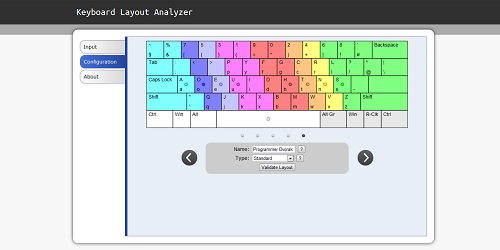
You can now try out a preview version of the new Keyboard Layout Analyzer. I completely re-did it from scratch. I know I’ve done that before, but I’ve learned a lot about JavaScript and HTML5 over the past two years and thought the application would be best served with a fresh start. Below you can see a screen capture of the new configuration page.

Configuration Tab

The biggest problem with the previous Analyzer was that it didn’t have the best configuration options. And even then, the top-based tab interface led to a lot of people not even noticing that configuration options existed. My main goal was to make configuration much more intuitive and flexible.

The previous Analyzer also assumed keys to be atomic and wouldn’t let you mix and match characters from different keys. For English keyboards this was mostly fine, but when I started learning about Foreign layouts and specialized layouts like the Programmer Dvorak, I realized I’d made a fatal mistake. The old code centered around atomic keys and even used image icons for the configuration display. For this version, I decided to draw the keyboard on a canvas element and to allow keys to mix and match characters. Theoretically, the new setup could even analyze unusual layouts like the Maltron layout, but I haven’t yet created Keyboard Maps for that layout, nor have done much testing in that area (though it’s a goal).

I also tried to make the app look more visually appealing and to provide a better user experience. The old layout was kind of amateurish looking, a number of people didn’t utilize the top-based tabbed interface, and the amount of scrolling you had to do on the output page made it easy to miss interesting information – not to mention that I was using pie charts, which are notoriously bad at presenting this type of information (I had a decent number of people email me asking me to switch to bar charts). I tried my best at making something that was reasonably ok looking, and I hope the new side-tabs making navigating the information easier.

I’ve recently taken on a lot at work, so that has slowed me down quite a bit, but I hope to finish off the rest of the output sections in the coming month. If you find any bugs or have any suggestions please let me know!

Coming updates

Photo By gureu

Two updates for the price of one today. It’s been killing me that I haven’t been posting more. I’ve been switching between projects a lot lately and I’m ultimately left with a lot of stuff that’s between 25%-75% done.

Coming up within the next month there will be a make-over/overhaul of an existing app. I also started some big updates for the baby naming tool, but temporarily shelved them when I started the remake of the previously mentioned app – though I’m not sure when these updates will be out. I’ve also been experimenting with FireFox addons, but I haven’t yet put together anything interesting. Sometimes I feel like I have programmer ADD.

Anyway, I just wanted to let you all know I’m still actively working on stuff for this site and haven’t forgotten about it. Sorry it’s been so quiet lately!

patorjk.com Goes On One Month Hiatus (Updated June 2nd)

The Moon, Right Before Its About To Go On Break
Tired Moon

I try to make sure this site is updated at least once a week. Often times I let it slip to every other week. When it goes past that, I usually get kind of upset with myself.

With that said, I’m a little embarrassed that I’ve been slacking on the update front, however, a lot is going on in my life right now and I just haven’t had the time I’ve wanted to work on stuff. I currently have some new updates to the Typing Speed Test in the works and I’m about to start work on a new app for this site. However, since I’ve been pressed for time, I haven’t really gotten much done during the last few weeks. So rather than string people along who regularly check in, or make subscribers wonder why there haven’t been any updates, I figured I’d just take an official break. I’ll still be working on stuff over the next month (when I get the time), I just wont update until the start June.

If anyone has any update requests for the Typing Speed Test let me know. I’m leaning towards reworking it to be more oriented towards typing correct characters instead of typing correct words, but I don’t know yet. It seems like there are a lot of different ways to give a typing speed test and no one way really jumps out at me as the best way.

June 2nd Update: I’m still in the process of moving into my new place and I’m currently in “crunch mode” at work, so it’ll be a little while longer.

My First Try At Revamping My Typing Speed Test

I’ve just updated my Typing Speed Test. I basically just implemented the changes that people suggested to me. These included:

  • Allowing the user to type real sentences, for example, stuff from books.
  • Adding more text input options.
  • Cutting the default time down from 60 seconds to 30 seconds.
  • Not having the text scroll as the user types and letting the user see all of the text they will have to type.
  • Highlighting of the correct, incorrect, and the current word in the box displaying the text that needs to be typed.
  • Providing obvious instructions on what to do.

I was unsure about how to display the instructions, so I just put a yellow information box at the top of the page. The only other thing I could think of was to start the app with a Ext JS-style message box, but I figured that would get really old after a while. Also, the spacing at the bottom of the page is kind of weird because I wanted the tab sizes to be static. I’m not sure if that’s the best design idea, so that may change.

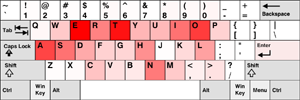
A possible visualization indicating which keys were typed fastest
For the next release, I’m thinking about adding in more stats on how fast the user types. Maybe giving them info on what keys they typed fastest via a visualization or some bar charts. A line graph showing their progress over time might also be cool. However, JavaScript may not be fast enough to let me do this. While beta testing today I noticed that sometimes I almost got ahead of the app, and keeping lots of extra stats may slow things down too much, I’ll have to see though.

Thank you to those of you who gave me suggestions. I think the test is much, much better now.

If anyone has any more suggestions or finds any problems please let me know!

Oh, and one last news worthy item, I also updated the About page on this blog with some more info and pictures.

URL Structure Changes And Future Plans

One of the things I thought I had gotten right when I relaunched this site was URL structure. I thought I’d put all of my web apps in one sub-folder, all my programming stuff in another sub-folder, common libraries in another sub-folder, etc. However, since then I’ve realized my URL structure wasn’t that optimal. A lot of the sub-folders just made the URLs longer and the mashing together of words made a lot of the URLs hard to read. Examples:

https://patorjk.com/blogstylometrytool/
http://patorjk.com/colorfader/
http://patorjk.com/keyboardlayoutgenerator/
http://patorjk.com/software/gradientimage/
http://patorjk.com/software/colorpalettegenerator/
http://patorjk.com/typingspeedtest/

So, to pretty things up a bit, I’ve decided to change how I’m structuring URLs. My new rule of thumb will be to separate words with hyphens and to only use sub-folders when absolutely necessary. Since domain names are supposed to be compact, I think it makes sense not to include them in my hyphen rule. The new locations of the tools talked about above are:

https://patorjk.com/blog-stylometry-tool/
http://patorjk.com/text-color-fader/
http://patorjk.com/keyboard-layout-generator/
http://patorjk.com/gradient-image-generator/
http://patorjk.com/color-palette-generator/
http://patorjk.com/typing-speed-test/

This seems like a rather superfluous change, but it was just one of those little things that was bothering me. I don’t plan to move anything else unless I make a major update to it, and all of the old links are 301 re-directed.

The one program I didn’t move was the Text Ascii Art Generator. This is because it has a bunch of links pointing to it and I didn’t want to mess up its standing in the search engines.

As for my current future plans, I hope to improve some of my existing web-apps. Unfortunately I was kind of tight on time this past week (I had to work past 9PM three times, I’ve got a lot to do at work), but I did do some mock-up Ext JS layouts for the Typing Speed Test program. However, after a little bit of thought, I think I’ve decided I’m just going to extend and change the one I currently have written. I hope to have a new version of it out within the next two weeks. After that, I’m going to try and refurbish another one of my apps.

Lastly, if anyone has any problems with accessing programs using the new URL structure (via old links or whatever), please let me know.

2008 Is Coming To A Close…

The end of 2008 is approaching. It’s been a good year for this site. I’ve learned a bunch of new things, and the site grew significantly in its content and daily traffic.

Right now I’m enjoying the holiday, so I don’t have any new content to add, however, I figured I’d post up my patorjk.com-Related Goals for 2009:

  • Get good at JavaScript. It’s been a while since I’ve felt like I was really good at a particular language. At work, I was referred to as a “language person” by my boss several times since I seemed to be able to dive into any language they threw at me. Versatility is good, but sometimes I feel like I spread myself too thin. I could possibly get really good at Tcl, since I do a decent amount of Tcl programming at work, however, Tcl isn’t that fun of a language and it doesn’t easily do the things I would want to do (I could rant on and on about the pros and cons of Tcl, but I’ll spare you all).
  • Learn jQuery. Right now I’m learning Dojo, but I’d also like to learn jQuery, since I know my company uses and it appears to be the most popular JavaScript framework. Being familar with a couple of these frameworks is probably a good thing too.
  • Develop More Web Apps. I only released 4 total this year (not including ones that were re-done). This is well under the number I wanted to release. In the future I hope to release one a month, however, I don’t want to set myself up with an impossible goal, so I’ll just say I want to make more.
  • Read At Least 4 Programming Books. I’m going to leave 2008 having read 2 completely and 4 part way through. Books can be a great motivator and a good source of learning.
  • Join A Programming Community. I wasn’t able to relaunch the patorjk.com forums this year, however, I do still miss the community of the old forums.
  • Write A WordPress Plug-In. WordPress is the name of the blogging software I use. I’ve played around with it a bit, but I haven’t really tried writing my own plug-in.
  • Release Some Programming Examples. It’s been too long since I released one.

It’s 3:30AM right now, so there may be a few I’m missing, but I think those sum up my mind set right now. Professionally I think I’d like to get back into .NET programming (I miss VB, but for a hobby, I want to stay focused on something, and right now I’m more into web programming than I am into Desktop apps). However, I have no idea what I’ll be doing this next year or even how much I’ll be able to say about it.

2009 year should also be a big year for me personally. Right now I’m looking for a house with my girl friend, so I’m really excited about that. Also, my awful case of tinnitus (constant ringing in the ears) has gone down by about 75%-90% thanks to my switching toothpastes from one that contained Potassium Nitrate to one that didn’t (sensitive toothpastes typically have Potassium Nitrate), and I think it may go completely away. If you know anyone with tinnitus, be sure to pass on this bit of info.

Anyway, I hope you all are having a happy and safe holiday and I hope you keep checking back in!

patrickgillespie.com – What Should I Do With It?

Not many people search for the phrase “Patrick Gillespie”, but those who do find that the first listing is a short little article about Patrick Gillespie failing to register as a sex offender. Once you read it you can see that it’s not about me, however, it kind of sucks to know that that’s what people see when they Google my name. A few girls I’ve dated have even brought it up, usually just to make a joke, but it does solidify my concern that people find information about me by Googling my name, and if someone is searching for me, I don’t want their first thought to be “Is this guy a sex offender?”

Today things took an interesting turn and I might be able to unseat that crappy website. I was notified by a fellow commenter at seomoz.org that patrickgillespie.com was available for purchase. This is the first time I’ve seen this domain available. In fact, it just went back on the market around 30 days ago. I think for the past 10 years or so some realtor has had it, or maybe someone just had it parked, but either way, it wasn’t very popular or memorable in its previous form. Part of me wonders if the owner let it expire by accident, but I guess that sucks for them. Though I did leave patrickgillespie.net and patrickgillespie.org available for other Patrick Gillespies to pick up.

My main concern now is, what do I do with patrickgillespie.com? I could have it point here, but I kind of want to do something a little more creative, I’m just not sure what. Here are some ideas I was tossing around in my head:

  • Personal Blog: This would be the easiest thing to do. However, I already have a livejournal I don’t update much, and I can’t say much about the work I do at work, so I’d feel like this angle might not be very fruitful.
  • Topical Video Blog: Something where I could post videos to get across certain topics. I do a lot of online research, and sometimes I find some interesting videos on sites like youtube. A blog that assembled video information on various topics could be interesting.
  • Resume Site: A boring option, and probably something that wouldn’t rank well, but a decent filler idea if I can’t decide on anything.
  • A Weird Art Project: Something like this, something that just makes people scratch their heads, however, they explore it further because it’s intriguing.
  • Patrick Gillespie Information Center: Some kind of web app that aggregates information on people named Patrick Gillespie.
  • Puzzle: Maybe have the page just be a puzzle of some sort. Like a riddle that the user has to solve and if they do they can get some kind of reward.

That list basically makes up the ideas I was able to come up with today. Does anything jump out as a good idea? If anyone has any suggestions, please let me know.