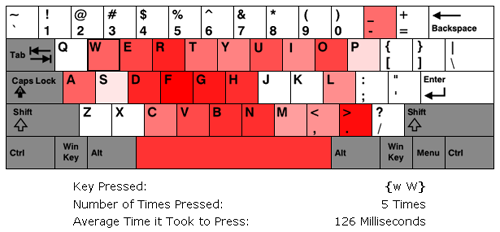
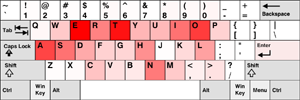
I’ve updated my Typing Speed Test with a new feature that lets you see how fast you typed each key on the keyboard. Once you finish the test, you’re presented with a visualization of the keyboard where the keys that were typed faster are more red and the keys that were typed slower are less red. Keys that are completely white were not typed at all and grey keys aren’t factored into the calculations. To see stats about an individual key, all you have to do is mouse over the key you’re interested in. Below you can see a screen capture of the feature.
A screen capture of the Hot Spot Visualization feature. The mouse was hovering over the "W" key when this shot was taken.
Let me know if you see any problems. I still have two major features I want to add into this app before I move onto my next project.
EDIT March 26, 2009: I’ve updated the visualization. Blue now represents key that were typed slowly and red represents keys that were typed quickly.
As of March 21st, it’s officially been two years since I decided to relaunch this website. On the opening day there wasn’t any hype and the site had been down for 2 months – and before that, I think I’d only updated twice in the previous two years. Plus, on this new day, all I had up was a message saying I’d be back. I couldn’t post up anything because my previous host had deleted all of my content and my hard drive had just recently crashed, taking with it everything I had saved. Other than being a lesson in routinely backing up files, this gave me a chance to start fresh.This site, shortly before being deleted
It’s been two years and I think this site is currently as successful as its ever been. I don’t have a community like I used to, but I do have a decent amount of traffic and links coming in. The site, as a whole, currently gets around 2,700 visitors a day. So I feel good that I’ve been able to come back with something that people (hopefully) find useful and/or entertaining. I suppose it’s just a different site now than it used to be. I’m still steering the ship, and I’m still programming, but I’m using different tools and doing different things.
I think the thing I’ve enjoyed the most over the past two years is seeing the stuff I make or post up actually being used. When working in a big company, sometimes you program something up, hand it in, and then move onto your next assignment. You don’t really get to find out the experiences of the end user or what they thought of the program. You don’t know if they struggled to understand what you did or if they loved it. Well, sometimes you find out, but not always.
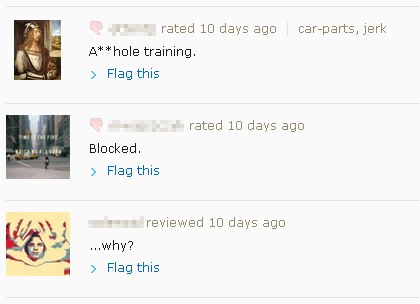
The cool thing about the web is that anyone can see the stuff you make. And to get feed back one can just google around or look at their referral logs and see where people are coming from. Sometimes this leads to some interesting info about how people are preciviing and using what you have up. Check out these Stumbleupon reviews I found of my 179 Ways to Annoy People chain letter page:
Annoyed Visitors
I think a certain number of visitors were thinking it was a real list. I thought it was obviously a joke, but you never really know what people are thinking when they come across your site, so I added in note at the top of the page letting people know it was just a joke list. Though I suppose some of the reviewers might have realized it was a joke and were just plain offended by it, however, calling a joke list “Asshole Training” seems a bit odd. [As a side note: I’m thinking of getting rid of this page entirely, since it doesn’t really go with the rest of the site, though maybe I just wont link to it and let its only source of traffic be 3rd party services like search engines and Stumbleupon]
Another interesting observation I was able to make, this time via my stats, was that a decent number of people were going to my Text Ascii Art Generator program and then just exiting via one of the out going links on the About page. This seemed like a rather strange behavior so I changed the program to automatically display the message “Type Something” once the page was loaded. This ended up causing a big increase in the usage of the program. My guess is that people were visiting the app’s main page and then getting confused as to what they were looking at, so they’d just skim the page and click on one of the out going links. It’s stuff like this, as a developer, that I’d never catch unless I had access to usage stats or user feed back.
Anyway, for those of you who’ve decided to follow this site for whatever reason, I thank you for checking in every so often. It definitely is nice to see stuff I make being used and to get feed back on it.
Some big updates were made to my Typing Speed Test. I’ve spent the last two weeks brainstorming and implementing ideas I thought would make it more useful. Once I found I could easily capture the speed at which the keys were typed I realized that this also meant I could deduce how fast each finger was moving.
However, to be able to accommodate Dvorak and Colemak users, I had to make the user’s keyboard layout one of the configuration items. I also realized that not everyone types according to the standard fingering positions, including myself. I noticed this back when I was learning the Dvorak layout. My right pinky kept getting really sore. When I switched back to the QWERTY layout, I noticed that the only keys I used my Right Pinky for were the “Enter” key and the “Right Shift” key. To accommodate the people who deviate from the norm, I also made it so users could manually set which fingers they used for each key.
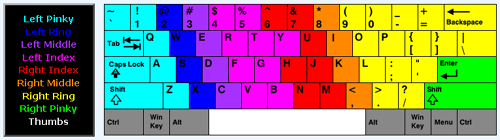
Allowing users to change the normal Finger-to-Key mapping lead to some hard user interface decisions. What I ended up creating was a keyboard map where the user changed a key’s mapping by clicking it one or more times. When it’s clicked, its mapping goes to the next finger in the legend. I initially had a design that used radio buttons, but I didn’t like all of the back and forth movement it caused with the mouse. I’m still not sure I have the best design, but for now I think what I have works fine. Below you can see an picture of the user interface. The keys are set with the finger positions I typically use.
My custom keyboard finger positions.
Once you finish the test you’ll now be presented with stats on how well you typed and stats on how fast your individual fingers were. To make the test more blog friendly, I also decided to present the user with the HTML code for the output tables. Below you can see two of my tables from a run I did.
I should note that the finger speeds are based on all of the key presses you make and not just on the ones that lead to correct words. Also, FireFox seemed to be able to detect Backspace key presses while IE did not.
I still have a bunch more ideas that I want to add in, but I haven’t gotten to them yet (like the hot spot visualization I mentioned in my last post).
If you find any errors or bugs let me know. You can post them in the comment section of this post.
I’ve just updated my Typing Speed Test. I basically just implemented the changes that people suggested to me. These included:
Allowing the user to type real sentences, for example, stuff from books.
Adding more text input options.
Cutting the default time down from 60 seconds to 30 seconds.
Not having the text scroll as the user types and letting the user see all of the text they will have to type.
Highlighting of the correct, incorrect, and the current word in the box displaying the text that needs to be typed.
Providing obvious instructions on what to do.
I was unsure about how to display the instructions, so I just put a yellow information box at the top of the page. The only other thing I could think of was to start the app with a Ext JS-style message box, but I figured that would get really old after a while. Also, the spacing at the bottom of the page is kind of weird because I wanted the tab sizes to be static. I’m not sure if that’s the best design idea, so that may change.
A possible visualization indicating which keys were typed fastestFor the next release, I’m thinking about adding in more stats on how fast the user types. Maybe giving them info on what keys they typed fastest via a visualization or some bar charts. A line graph showing their progress over time might also be cool. However, JavaScript may not be fast enough to let me do this. While beta testing today I noticed that sometimes I almost got ahead of the app, and keeping lots of extra stats may slow things down too much, I’ll have to see though.
Thank you to those of you who gave me suggestions. I think the test is much, much better now.
If anyone has any more suggestions or finds any problems please let me know!
Oh, and one last news worthy item, I also updated the About page on this blog with some more info and pictures.