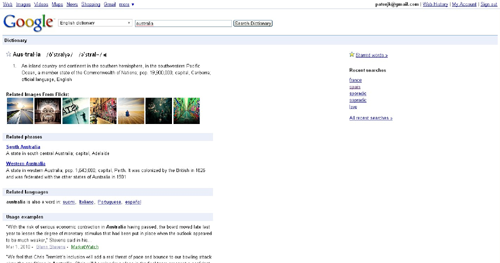
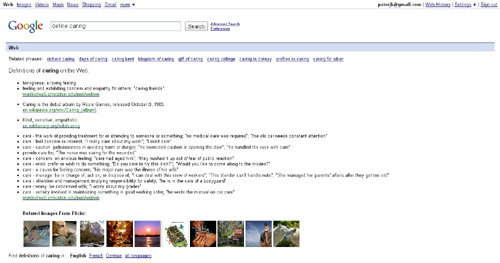
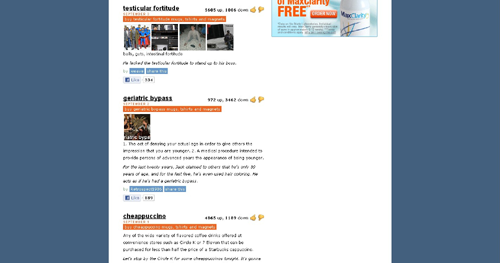
One of the characteristics of web browser extensions that excites me is that you can write plug-ins for your favorite websites. For my next extension I wanted to create something that was a plug-in to a specific website or websites. After mulling over possible ideas, I decided to create an extension would augment the definitions from dictionary websites with relevant images. The result is Image Definitions for Dictionaries, which is a Chrome web browser extension that augments the results of Google Dictionary, Google Search, and Urban Dictionary with images from Flickr.
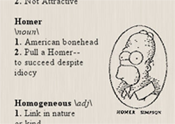
Image From Homer DefinedThe idea for this extension came from an episode of the Simpsons where Homer is repeatedly defined in the dictionary, with his picture appearing next to certain words. I thought it would be interesting if that’s how all dictionaries worked. They would have an image next to the word they were defining and that image would be determined by what the web thought was most relevant. I thought this would especially be interesting for the more eccentric dictionaries like Urban Dictionary. Urban Dictionary does already have an image feature, but it’s based on user uploads and isn’t heavily used.
After playing around for a little bit, I had an extension that worked for the previously mentioned sites. Below you can see a slideshow which lets you see how the Flickr thumbnails are integrated into the dictionary webpages (clicking on a thumbnail within a dictionary site will take you to the image’s Flickr page):
One of the characteristics of web browser extensions that excites me is that you can write plug-ins for your favorite websites. For my next extension I wanted to create something that was a plug-in to a specific website or websites. After mulling over possible ideas, I decided to create an extension would augment the definitions … <a href="https://patorjk.com/blog/2010/10/11/image-definitions-for-dictionaries/" class="more-link">Continue reading <span class="screen-reader-text">Google Dictionary + Urban Dictionary + Flickr API</span> <span class="meta-nav">→</span></a>
One of the characteristics of web browser extensions that excites me is that you can write plug-ins for your favorite websites. For my next extension I wanted to create something that was a plug-in to a specific website or websites. After mulling over possible ideas, I decided to create an extension would augment the definitions … <a href="https://patorjk.com/blog/2010/10/11/image-definitions-for-dictionaries/" class="more-link">Continue reading <span class="screen-reader-text">Google Dictionary + Urban Dictionary + Flickr API</span> <span class="meta-nav">→</span></a>
One of the characteristics of web browser extensions that excites me is that you can write plug-ins for your favorite websites. For my next extension I wanted to create something that was a plug-in to a specific website or websites. After mulling over possible ideas, I decided to create an extension would augment the definitions … <a href="https://patorjk.com/blog/2010/10/11/image-definitions-for-dictionaries/" class="more-link">Continue reading <span class="screen-reader-text">Google Dictionary + Urban Dictionary + Flickr API</span> <span class="meta-nav">→</span></a>
Previous Image
Next Image
info heading
info content
Using the Flickr API turned out to be a breeze, though most of the functionality I needed was already provided in an example created by Google. I did briefly look into using other APIs, or having the option for multiple APIs to be used, however, I wasn’t able to find a service comparable to Flickr’s API. Google’s has Google AJAX Search API, but that appears to be aimed at providing searching services and it doesn’t seem to give you access to individual thumbnails. I looked into some other services too, but nothing jumped out at me.
Anyway, I hope this extension can be of use to some of you or provide you with some entertainment value. If anyone has any requests for sites I should support, or has any suggestions for the extension, please let me know.
Photo by ktpuppI’ve made a small update to my Typing Speed Monitor Chrome web browser extension. You can now exclude statistics that come from certain domains. It was a feature requested in the comments section and I figured it would be useful for people who don’t want certain websites to effect their statistics.
I’m not sure how far I want to go with this app. I have a couple more feature ideas, and I would have added more with this update if I had not been busy working on another extension (see my next update). We’ll see though. If you have any feature requests just let me know.
After being somewhat frustrated with a web app I was having to repeatedly check, I decided to try my hand at writing a Chrome web browser extension. I basically just wanted to have a little notification pop-up when the web page told me a certain event was occurring, that way I wouldn’t have to keep checking it. After tinkering with one of Chrome’s sample extensions, my page checker/notifier was up and running perfectly. I had expected its development to be kind of painful, but it luckily wasn’t painful at all.
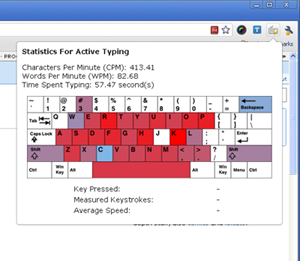
Typing Speed MonitorAfter its creation I decided to explore extensions a little more. I had a few ideas in mind and figured I’d implement one to see what I could do. I decided to first go with creating a “Typing Speed Monitor”, something that would capture what an average user’s typing speed was, tell them how much time they spent typing, give them statistics about what they typed, and give them a visualization to play around with. It was a pretty simple idea, but it involved messing around many of the areas of extension development and I think it came out well, so I think it was a good first project (not counting the project I created out of an example). If you’re interested, you can download it from the Chrome Extension Gallery here.
I’ve also uploaded the source to the extension to patorjk.com and you can check that out here. Since this is a pretty basic extension, nothing too complicated is going on, but I figured I’d post it up in case anyone was curious as to what was going on underneath the covers. I have a few more ideas for additional features, but I’ll first see if anyone actually uses the thing. Also, I’d be interested in making this app more internationalized, but I’m not completely certain on how the JavaScript keycodes work for foreign keyboards. If anyone has any information on this please let me know.
On a related note, later this year Google will unveil the Chrome Web Store, which actually sounds kind of promising. It’ll feature web applications, Chrome themes, and Chrome Extensions (the extensions will be moved from the gallery to the store). The store will feature free applications along with ones users can pay for. I really like the idea of a repository for web apps, and it seems like it’ll give developers a good outlet for their ideas. Anyway, it’s something to keep an eye on.
Last week I handed in my letter of resignation to Northrop Grumman, the company I’ve worked at for the past 4 years. I was both excited and nervous at the same time. Nervous because it was a big step, and excited because I was starting a new job as a subcontractor at a small company in two weeks.
Photo by gaborkThe past three years I’ve spent most of my time creating and maintaining Java and Tcl/Tk applications, with the majority of my time going to Tcl/Tk development. Both of these are fun languages, but I kind of wanted to get away from these as my primary focus and move into doing web development. Northrop is a pretty huge company and allows people to move around, but from the inside it looked like my future involved mostly C/Java/Tcl, so I decided it was time to see what was available outside of the company.
I’ve had a few friends successfully change jobs within the past year and decided to hit up one of them about possible jobs in his company. I ended up interviewing for and landing a job as a PHP developer. Since I’ll be a subcontractor, what I work in will vary from project to project (just like at Northrop, actually), but I’m in a position to take on a more diverse set of projects that I think will be geared more towards my interests. I also think getting to see how smaller companies work will be an interesting experience.
Lastly, I’ve decided to carry on with my rule of not talking about work on this blog, with the exception of big announcements, so this will probably be my last work themed entry for a while. Hopefully it helps me pick up some cool new skills and I’m am able to apply some of what I’ve picked up making the content for this site professionally. Also, I know I’ve sort of been neglecting this site due to perparing for the new job, but I think this site will benefit from it in the long run. If you’re interested in changing jobs and have any questions feel free to shoot me an email me or post in the comment section below.
The Muller Formula is a neat little color formula that aims to predict which sets of colors people will find pleasing. No actual formula is given for it, but it’s concept is described. Given a set of colors with the same hue but a different lightness, the colors with the lighter hues should be shifted to a more naturally bright color and the colors with a darker hues should be shifted to a more naturally dark color. I thought this was a neat idea and figured I could possibly simplify it to work with a single color (what I decided to call a “Muller Color”). If a color had a high lightness, its hue would be shifted to a naturally light color. If it had a low lightness, its hue would be shifted towards a naturally darker color.
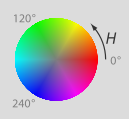
HSL Color Wheel Image By Jacob RusThe original article used a the traditional artist’s Red-Yellow-Blue color wheel. I wasn’t able to find a good conversion formula to go from the Red-Green-Blue color model (RGB) (which is popular in computing) to the Red-Yellow-Blue color model (RYB), but I did find formulas to go from RGB to the Hue-Saturation-Lightness color model (HSL). I figured this would work well since the HSL model had everything I needed to calculate a “Muller Color”. I could detect the lightness of a color and then adjust its hue accordingly.
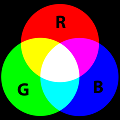
Looking at the HSL color wheel, I decided to use the primary colors (Red, Blue and Green) as the more naturally dark colors, and the secondary colors (Yellow, Cyan, Magenta) as the more naturally light colors. This decision was just based on my own judgement. Using the HSL color model and the concept described by the Muller Formula, I was able to generate interesting colors from RGB inputs. And to make a long story short, I ended up using this idea in my Image to Color Palette Generator app. A color palette would be generated of an image, but in addition, the user would also see a palette of the corresponding Muller Colors.Primary and Secondary Colors Image By SharkD
I figured I was done with this idea until I received a recent email from someone suggesting I take the images people input into the Color Palette Generator program and create “Muller Images”. Basically, call the Muller Color formula on every pixel in the image and generate a new image. I thought this was a really cool idea so I whipped up a quick prototype which you can see here. The shift percent indicates how much a color should shift. For example, if the color is between red and yellow and the shift is 100%, it will become yellow if it’s light and red if it’s dark (a dark yellow would even end up becoming red and a light red would end up becoming yellow). If the shift is just 50%, it will just shift 50% of the way closer.
Unfortunately, the results weren’t as stellar as I hoped. Calling the Muller Color formula on every pixel caused them to gravitate towards similar colors, so the resulting image tended to look like poorly compressed gifs. An example of a 10% shift can be seen in the Bernie Madoff pumpkin pic below.
Normal Image and Muller Color-ed Image
It was still a cool idea, and maybe it could still be used for something, though it’d probably have to be tweaked a little bit. There are other images available to Muller-ize on the experiment page if anyone else is interested. Thanks to David Dailey for the idea on this one.
My wife and I cutting our wedding cakeOn Saturday I got married :). The past couple of months have been a little hectic, though probably not as much for me as for my wife. I’ve had a lot of stuff going on and I do feel a little bad that this site has been put on hold a little bit. However, weddings are crazy and I had no idea how much energy goes into them (including this wedding, I’ve only ever been to 5 weddings – 4 of them have been in the past year and a half). Our wedding was held at the Engineer’s Club in Baltimore and there were 130-something attendees.
Since the wedding is now over, activity on this site will probably pick up some. I’ve been reading a lot of books in my spare time so I may do a few book reviews, however, I don’t want to turn this page into a book review site, so if I do go that route I’ll space them out somewhat.
Super Mario Bros Groom's CakeAlso, before I forget, my advice to anyone getting married soon would be this:
Wear comfortable shoes. My feet were killing me at the end of the night.
Dance lessons were well worth it. Take them!
Try to talk to everyone during dinner and don’t get stuck at one table.
If there’s some food you want, have someone get you some or have it set aside (I missed out on the delicious strawberry layer of our cake – and on the delicious pigs in a blanket finger food).
The day will be a lot of fun, don’t sweat it!
Lastly, the cake to the right was a groom’s cake that my bride had made for me :). She gave them some pics of other Mario wedding cakes so it’s similar to them, but toned down since it was just for a rehearsal diner. Mario and Peach were a little pudgy, but I thought it was a really, really cool cake. At the time of its making I was kind of obsessed with the New Super Mario Bros game for the Wii, which is why she had it done.
Pro JavaScript Design PatternsFor a while I’ve been meaning to read a book on design patterns, which are ways to design and structure solutions to common problems in order to create efficient and optimal results. I missed a chance to take a course on them back in college when I took Cryptology instead, and have since been meaning to sit down and read up on what’s been developed and what can be useful to me. So it was to my happy surprise when I stumbled across Pro JavaScript Design Patterns in the book store a while back.
The book is broken into two parts. The first part explains how object oriented programming concepts work in JavaScript and how to implement the ones that aren’t built into the language, such as interfaces and private members. The second part of the book focuses on a common set of design patterns and how they can be implemented in JavaScript. It covers the following patterns, giving a chapter on each one: Singleton, Factory, Bridge, Composite, Facade, Adapter, Decorator, Flyweight, Proxy, Observer, Command and Chain of Responsibility.
Before I go any further, while I’m going to write a mostly positive review for this book, I should say that I initially tried to read it around 18 months ago, but stopped after I finished the first section. I re-read it from start to finish about 2 months ago. I stopped the first time I tried to read it because the book introduces a lot of ideas and I was a little confused on some of the concepts it touched on. Specifically, I was confused with how constructor functions worked and how a function’s prototype property worked. I got distracted trying to understand this and picked up another book and ended up not coming back to this book (it’s hard for me to get back into a book once I’ve set it down for a while). As for constructor functions and the prototype property, a good explanation of them can be found here.
I had better luck on my second read through and found the second half of the book to be an easy read. Though each chapter focuses on a different design pattern, some of them use patterns introduced in earlier chapters, so it’s actually a good idea to read the chapters in order. Each of these chapters starts by explaining the basic idea behind the pattern and then goes into a couple of real world examples of how the pattern is used. The chapters close by discussing the benefits and drawbacks of the pattern they introduced and some advice is given to help you identify situations where using the pattern would be a good idea.
Overall, I found this be to be extremely interesting. I could possibly have learned about the different design patterns by reading online tutorials, but being able to look at solutions in JavaScript was very helpful. Also, after reading certain chapters, I felt like going back and rewriting some of my old apps (though I’ll contain myself). Knowing about this collection of design patterns is a huge plus for me and for that alone I’m glad I read this book. I wouldn’t recommend this book to someone who doesn’t have a good understanding of prototypal inheritance, but if you feel like you do, this book is worth checking out. If you don’t, I would recommend looking up some design pattern tutorials online and trying to learn about the common patterns, you’ll be glad you did.
On a side note, I was also amazed at how many of these patterns I’d seen before. It certainly gave me a better appreciation for some of the code bases I’ve seen in the past. I also found that I used some of the patterns already unknowingly, but that I didn’t have a name for the technique I was using.
If I could go back in time I would still probably take that Cryptology class, but I would also try and read up on Design Patterns too. If you have a few extra minutes, it’s worth reading up on them.
I have a beta version of my quiz app ready, you can check it out at one of the following links:
Quiz Guide – Same page shown a few entries ago, except this time the link to the Tcl/Tk quiz works.
Tcl/Tk Quiz – My first programming quiz for the PK app. I still plan on adding more questions, though I felt it was important to get a beta version out.
Right now all I have ready is a Tcl/Tk quiz. I’m guessing 90% of the people who read this will have no idea what Tcl/Tk is, but it’s a fun little scripting language that pops up in a lot of different places. Even if you aren’t familiar with it, the quiz will give you a feel for what the others will look like. I’ve set things up so that the quizzes themselves are JSON files, and are read in and generated on the fly by a single PHP page. The URL is set up to look like a directory, but it gets rewritten and pointed towards the PHP page (which will currently display the Tcl quiz no matter what, even if the quiz directory isn’t tcl-tk-basics).
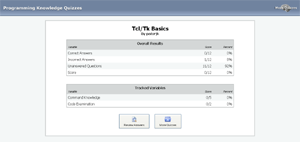
Results Page The quiz engine is currently set up to track multiple variables, with one variable acting as the “correctness” value to determine if a question is right or wrong. However, using a correctness variable can be turned off. The ability to track more than one variable allows the quiz to track different types of answers and to measure more than one thing. At the end of the quiz you’re presented with a table showing how you did in the various areas the quiz measured. Tracking multiple variables is how I imagine those online-dating site quizzes to work (the ones that will tell you about your personality, etc). I figured I’d keep my app as flexible as possible in case I wanted to do more creative things with it (though I have no plans to get into the online dating site world, I just want a flexible app).
Right now there’s only one type of question (multiple choice), though I hope to add more in the future. You also don’t lose points for incorrect answers. I’m still not sure if I want to add that ability in.
Also, while searching for icons to use in this program I found some pretty good resources, so I figured I’d share them here:
If you have any suggestions for the quiz app please let me know. I don’t think I’ve wasted as much time on any other app fretting about things that people probably wont care about. The app was actually partially re-written a couple times this past month. There’s was an ExtJS version, a version that used HTML tag generation instead of createElement (I’m still not sure what’s best), and lots of stuff I kept taking out and putting back in. However, I figured it was best to post a version up before I got old and gray.
Ext JS 3.0 Cookbook Packt Publishing recently provided me with a copy of their new Ext JS book called Ext JS 3.0 Cookbook. The only thing they asked for in return was a review stating my opinion.
For those who don’t know, Ext JS is a JavaScript library aimed at helping developers create web applications with customizable user interface widgets. The library is known being sturdy and for letting users easily create eye-catching designs. However, unlike many other JavaScript libraries, Ext JS is licensed under the GPL by default. For people wanting to avoid the GPL, a commercial license can be purchased.
Ext JS 3.0 Cookbook is a book which has the goal of providing Ext JS users with a wide variety of techniques and code samples with which they can use in their development of web applications. The book is well written, has nicely formatted code samples (which are also available in a zip file – a URL to the file is given in the book), and contains a lot of interesting information. However, I wouldn’t recommend it to everyone, which I’ll get to in a moment.
Ext JS 3.0 Cookbook is divided into 10 chapters, with each chapter covering a different topic of the library. However, the book can really be thought of as one giant, categorized, FAQ guide on Ext JS. Each chapter contains a series of “recipes”. These recipes are specific tasks a developer might want to perform, for example: “Displaying remote data with a combo box” or “Creating a grid panel with expandable rows” or “Creating an auto-refreshing chart”.
The definition of each recipe follows a set pattern of 5 sections:
The problem is described.
“How to do it…” – Code for solving the problem is provided.
“How it works…” – An explanation is given on how the code works.
“There’s more…” – Additional, possibly useful, bits of information are provided.
“See also…” – Other topics are suggested as further reading.
Each of these sections is given its own heading, though some recipes omit a section when it isn’t needed. This makes the book well suited as a reference guide since you know what you’ll be getting when you look something up. However, even though the book starts off with some recipes on working with the DOM and with data types, it’s not a book for Ext JS beginners. If you’re a new comer to Ext JS, you’re better suited by a book like Learning Ext JS.
Ext JS 3.0 Cookbook is really for those Ext JS users who are past the beginner stage and want something on-hand that will help them accomplish tasks they may run into or help them find better solutions to problems they’ve already had. If you work with the Ext JS library as part of your job or use the library a lot, having this book around would probably be beneficial. It’s nicely put together and has a lot of useful information. However, if you’re just a casual user of the Ext JS library, you’d probably find more benefit from an introductory text on the library or from just browsing their online documentation.





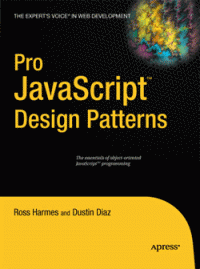
 in the book store a while back.