Monk-E-God, one of the most prominent figures from the AOL add-on programming scene of the late 90’s, has died.
Initially someone emailed me about “Tom” dying and I had no idea who they were talking about. I’m really bad with names so I always feel a little bad when someone from that era emails me. However, I remembered the “moorpark” location they mentioned and a discussion about it at knk4life.com – and that’s when it hit me that they were talking about Monk-E-God. I remember talking with him at what I think was knk’s old forums (and possibly later GPX’s forums, though I can’t remember if he was a member of that forum) and checking out his work at knk’s website.
I wasn’t really close to the guy, but I remember him as being one of the best programmers from those days. He was one of those people who’s reputation preceded them, it’s really sad to hear he’s gone. Thinking about that era brings back a lot of memories. If it wasn’t for that community and those days on AOL, I wouldn’t have become the programmer I am today.
There’s some more information about him at the digitalgangster.com forums, including a neat story about him meeting the Olsen Twins.
Layout Demo In the back of my mind I had been thinking about putting up some programming quizzes, similar to the ones I used to have on Visual Basic and C++. I was also thinking that it might be cool to have a quiz engine where users could create their own quizzes.
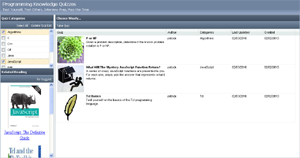
I’m not at that point yet, but this past weekend I decided to take the opportunity to try and learn ExtJS better and put together an interface for the app. You can see an image of the interface to the right or click here to see it in action. It’s pretty basic, but has all the functionality I think I’ll need for now.
The layout is broken into 3 sections. The top section is the header, to the left you can select quiz categories and get book recommendations, and on the right you get a list of quizzes. Hopefully the “Related Reading” panel doesn’t seem too commercial, as it was actually kind of fun to put together. I didn’t want to set myself up for having to write dozens of quizzes, so right now the interface only lists 3 quizzes (which I’ll hopefully have available soon).
Right now I’m in limbo about how complex I want this project to be. I’m not sure if I want users to be able to have accounts, and I’m not sure what data I’d want to store in a database. I’m also wondering if quizzes should be static html pages after they’re created. I’ll figure something out though.
Working with ExtJS was actually a lot of fun, and their online API documentation is fantastic. The library also seems to load rather quickly too. When I worked with Dojo, I was alarmed at the time the page took to load and how it looked while it loaded. I’m still a little bummed about the licensing for ExtJS, but I can live with certain things being GPL’d.
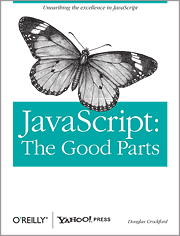
JavaScript: The Good Parts Last month I finished reading the short but densely packed JavaScript book JavaScript: The Good Parts.I had been looking for a book that would cover some of the pitfalls of the language more thoroughly than what I’d read about previously and when I saw this in the bookstore it seemed to fit the bill.
The thesis of the book is that JavaScript is a misunderstood language. It recognizes that there are bad parts to the language, but it contends that once you get past them there are some pretty nice good parts – and that by using only the good parts and avoiding the bad parts, you can write some really great code.
The book covers objects, functions, arrays, regular expressions, closure, and how inheritance works in JavaScript. The last one is probably the most important, since most people are only familiar with classical inheritance, and JavaScript’s prototypal inheritance, although wrapped in a syntax that makes it look classical, is very different. The book also discusses JavaScript’s bad parts and why you should avoid them.
Most of the concepts in the book are well explained, though I did find myself needing to re-read certain sections twice to completely understand the topic. This is in part because the book is very short, coming in at 153 pages (including the index). This is a double edged sword in that it allows you to take in a lot of material in a short amount of time, but sometimes you’re left wishing that a little more time was spent on a certain topic.
One other possible fault with the book (depending on how you look at things) is that it does not cover the DOM at all. The DOM isn’t part of the JavaScript language, but almost everyone who uses JavaScript will need to interact with the DOM. Therefore, this book is really more of a companion piece than a definitive reference for JavaScript programming.
Overall I really liked this book. It gives good coverage to some important topics regarding objects and functions, and gives a good explanation of prototypal inheritance. A lot of language quarks are also pointed out and explained. For example, one thing I didn’t realize was that the arguments array that is implicitly passed to functions isn’t a real array. It’s just an object with a length property. The appendix sections covering the “bad parts” and “awful parts” were also pretty interesting, though I disagree with the author that ++ and — are bad.
Anyway, I highly recommend the book if you’re into JavaScript programming. It’s a nice easy read that covers a lot of ground. Also, this is a non-solicited review, though the link above is an amazon referral link.
If you’re interested, the book’s author gave a one hour talk on this book that touches on a lot of its ideas. You can watch it here (actual talk starts at 2 minutes 15 seconds):
I’ve been bad about updating the past couple of months, I should have some interesting stories for next year though.
It’s been a pretty amazing year. I got engaged, bought a house, wrote a couple of new web apps, learned a lot about Tcl and JavaScript, visited Northern California (and then got stranded in Phoenix on my way back – due to the blizzard going on in Maryland), worked over 180 hours of overtime, and gained a lot of weight (the last one’s not a good thing, but it’ll give me a goal of losing weight for the new year).
I looked up my resolutions for this past year and I think I did ok. Here’s the list:
Get good at JavaScript: I feel like I’ve accomplished this one. There’s more for me to know, but I feel like I really know my way around the language.
Learn jQuery: Didn’t even look at it this year. There are a lot of cool JavaScript frameworks out there though. I’ll probably get around to learning jQuery at some point, but I don’t think knowing it is as important as I used to.
Develop More Web Apps: The Typing Speed Test, the HTML Canvas game, the Blog Stylometry Tool, and lots of updates to the Keyboard Layout Analyzer. I was sort of quiet near the end of the year, but I expect for things to pick up again here soon.
Read At Least 4 Programming Books: Learning Dojo, Learning ExtJS, JavaScript: The Good Parts, and Code: The Hidden Language of Computer Hardware and Software. JavaScript: The Good Parts and Learning ExtJS were the best of that group, and after thinking more about it, probably the only two I’d recommend from the list.
Join A Programming Community: I did not do this, unless you count my subscription to the Programming Sub-Reddit at reddit.com. I’ll give myself half credit here.
Write A WordPress Plug-In: I had a couple of ideas, but I lost interest.
Release Some Programming Examples: I still want to do this.
So I achieved 3.5 of my 7. Not too shabby, I feel like I accomplished what was important to me, and that’s probably better than meeting the goals I think up at the beginning of the year.
This probably wont be my last post of the year (I’ve got a book review coming), but I hope everyone out there has a great holiday and a happy new year!
Ext JS 3.0 CookbookIt’s been too long since I last updated. I didn’t intend to take such a long break from posting, but my life suddenly became really, really busy. In the somewhat near future I’m hoping to post some web-app updates, but I don’t want to state anything specific at the moment.
To finish the year off I have a couple of book reviews coming. Two unsolicited, and one at the request of Packt Publishing, who are providing me a copy of their new Ext JS book called Ext JS 3.0 Cookbook. I previously reviewed a book from them titled Learning Ext JS, which was pretty good. However, I didn’t end up doing much with Ext JS. My main concern was that I’d have to release the application under the GPL (using Ext JS in an application without buying a commercial Ext JS license causes the application’s source code to fall under the GPL, which is an open source license). Though I currently have a couple ideas in mind that I wouldn’t mind open sourcing, so this book may provide some interesting examples/ideas which I can polish them up with.
Also, Packt provided me with an affiliate link, so if you buy a Packt book after following the above link, I’ll get a small cut. I’ve noticed a lot of blogs seem to use affiliate links when doing reviews, however, I figured I’d make sure and state it just so you all know up front. This wont effect my review, but I figured it was worth stating for transparency reasons.
After reading up a on HTML5’s canvas element, I decided to re-tool the game I was working on to work inside of a canvas element. This was because the canvas element provides some great drawing functionality. You can resize, rotate, crop, position and alter the pixels of images you use on the canvas.
FireFox Appears to Have the Best Support for the Canvas Element Photo By M i x y
The game is still not done, however, I’ve uploaded another demo that shows the space ship and its main bad guy. You can use the arrow keys for movement and the “s” key to shoot. I changed the shoot key from the Space Bar to “s” because Opera was giving me issues when the Space Bar was pressed while the canvas had the focus.
Also, unlike last time, the game works best in FireFox, and basically sucks in everything else. Opera and Chrome can run the demo, but the frame rate is painfully slow. Since IE doesn’t support the canvas element yet, I’m using the JavaScript library Explorer Canvas to emulate it. Though you have to be using IE8 and be in “Quirks Mode” for it to work – and even then, the game is unplayably slow. Since the canvas element is part of the new standard, and one of its hyped uses is for creating games, I’m assuming / hoping that its performance is going to improve over the next couple of months in these browsers. However, since the canvas element is so cool, I’m still going to finish this game off even if it only works in FireFox.
For those of you interested in using the canvas element, Mozilla has a really good tutorial on it here, and there are some neat canvas game-themed tutorials here.
Lastly, and on a completely different note, I’ve written an update to the Is Someone Pretending To Be You Online? post I made a year ago. The update is at the bottom of the post and basically says the problem was due to a database error (which was a relief). I didn’t do an update right away since I didn’t want to embarrass the site owner.
“What would be something neat to do in JavaScript?” – I kept asking myself that on Saturday. My fiance was away for the weekend and I was just kind of hanging out at home with the dog. Eventually I ended up thinking about possibly trying to do a side scroller game, like Mario Bros or Commander Keen, but since I had never written one before, I wasn’t sure. Finally, I came to the conclusion that it might be wiser to go for something a little easier first, and decided it might be cool to port my old “Intergalactic Odyssey” space ship game to JavaScript.
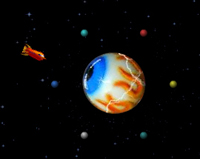
Old Intergalactic Oddyssey GameMy goals here were to just see how feasible it would be to create an action game with moving sprites. I didn’t get very far, but I was able to create a space ship that could fly around and shoot lasers. I was able to get the graphics by decompiling my old SWF Flash file (I’ve long lost the source to the game). Also, the space ship artwork was done by fitz. I originally found the space ship via Google Images, though I did ask before I used it.
So far the main issue I’ve run into is that IE and FireFox aren’t reliable for smooth game play. The demo works best in Google’s Chrome and Opera’s Opera web browser. Though at this point I haven’t added any collision detection in, or any bad guys in, so there’s still a ways to go before I know if I’ll have a playable game.
One thing I didn’t realize when I started was that I could rotate images. I googled for a little bit and didn’t come up with anything, so I wound up creating images for each of the different rotations of the space ship. Though now that I’ve read up on it a little more, image rotation can apparently be done with the Canvas object in FF, Opera and Chrome, and with filters in IE. I suppose I’ll find out later which method is faster.
Lastly, the key capturing events are a little frustrating, since JavaScript doesn’t appear to remember when someone is holding the Up-arrow down if another key is pressed while its down. I’m still trying to figure out if there’s a way to get around this.
If you have any tips/suggestions, feel free to let me know.
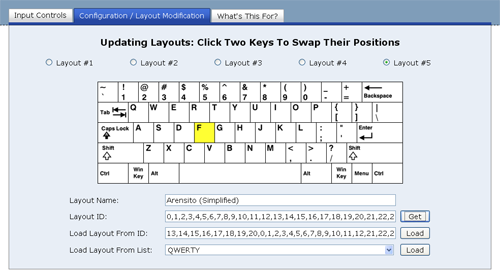
You can now create custom keyboard layouts and compare them against other layouts in the Keyboard Layout Analyzer. Below is a screen capture of the tab interface for the new feature.
Custom Layout Creator
Layouts 1-5 can now be configured any way you want them. So you can create your own layout and see how it stacks up against the more well known layouts, or you can make modifications to the existing ones and see how well your changes do.
Hopefully the interface is pretty straight forward. Clicking keys causes them to change places, and you can remember layouts you created with the use of the “Layout ID”.
I’ll be wrapping up my updates for this app pretty soon. I’m not sure what my next project will be, but I have a couple of ideas I’m considering.
I’ve added a new feature into the Keyboard Layout Analyzer that will let you know the distance your fingers travel while racing across different keyboard layouts. It’s interesting not only because it lets you know how far your fingers are crawling, but because it lets you test out one of Dvorak’s claims on why his layout was better than the QWERTY layout:
Dvorak estimated that the fingers of an average typist in his day traveled between 12 and 20 miles on a qwerty keyboard; the same text on a Dvorak keyboard would require only about one mile of travel.
Below I have the results of several pieces of text I analyzed. The QWERTY, Dvorak, and Colemak layouts are compared against each other. The distance shown for each is just an estimate, but it appears as if the idea of typing 20 miles in a day is a little excessive. Also, the Dvorak layout only seems to give you a 40%-45% improvement over the QWERTY layout when it comes to the distance you type.
Keyboard Monument (It uses a QWERTY layout) Photo By jasoneppink (cc)
QWERTY 0.7167 miles
Dvorak (Simplified) 0.4115 miles
Colemak 0.3619 miles
My Previous Post:
QWERTY – 0.0412 miles
Dvorak (Simplified) – 0.0233 miles
Colemak – 0.0211 miles
The algorithm for determining the distances is still being tweaked at the moment, so the distances may change in the future, however, it wont be dramatic. The biggest thing I have left to do is to factor in the pressing of the “shift” keys when an upper case letter is typed.
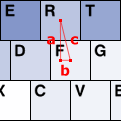
"c" is the distance between the "F" and "R" keys
To the left you can see a diagram showing how the distance between two keys is calculated. The center coordinate of each key is known, so the Pythagorean theorem (c² = a² + b²) is used to calculate the distance between keys. The horizontal distance between the center of two letter keys that are next to each other is said to be 1.9 cm [reference]. This is 40 pixels in my set up. Therefore, I calculate the distance in pixels, and then convert it to meters by dividing by 40 and then multiplying by 0.019. I’m probably currently doing way more calculations than I should be doing, and that will be optimized later, but for now this is how its currently working.
If you’re skeptical about the distances you get back from the program, you can also try Colemack.com‘s Layout Comparison Tool, which also produces estimates on typing distances. They’ll be slightly different from what I display, but they’ll be within the same ballpark. As an aside, somehow I missed seeing that app until recently, but at least our programs have their divergences.
Let me know if you have any issues with the distance calculator. Also, I’ll hopefully have some more updates to the Keyboard Layout Analyzer coming within the next week or two.
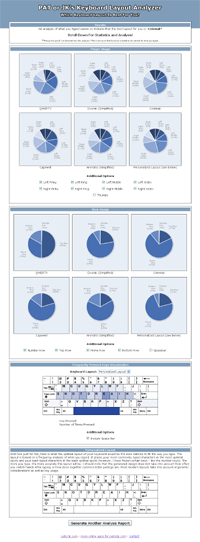
I’ve uploaded a new version of my Keyboard Layout Analyzer. You can see a full screen capture of the output page below. The new version has a layout similar to the one I discussed in my last post, and has a different chart set up, as well as a hand full of other small new features.
The New Layout For Keyboard Layout Analyzer Output
This new version is essentially a complete re-write of the old version. I had been making mental notes of features I thought would make the program a lot more useful, and after thinking about how I’d implement these new features, I realized I’d be better off just re-writing the application instead of modifying the old one.
This re-write was also a way for me to “pay down” my “technical debt” (I think I like that term), as I was able to more efficiently implement certain things to make them a lot more flexible. When I write stuff for fun, a lot of the time I just go with the first or second implementation I think of and then get to work. This re-write will probably serve as a good lesson learned, since the re-write was a little more painful than I expected. Only one of the new features that I thought up is in the program right now (the new chart set up), I didn’t have time to get to the rest of them, though I hope to implement them in the next couple of weeks.
Here’s an overview of what’s in this version:
Updated interface.
Able to view charts of different layouts all at once.
Able to select what pieces of information you want to factor into the charts.
Addition of the Capewell and Arensito (Simplified) layouts. However, this set up isn’t final. These layouts will still be in the next version, but the options will be a little different.
“Personal Layout” factored into the statistics.
A layout recommendation is made based on what you typed.
This new implementation also consists of 26% fewer lines of code. 🙂
This new version was tested out in Firefox 3.0 and 3.5, Chrome, and IE8. Unfortunately, the new IE8 messed up my install of IE6Eolas, so I’m not sure how the app works in IE6 or IE7. Oh, and I hate to rehash the cliché of bashing IE, but IE8 is actually a lot slower than IE6 and IE7 when it comes to executing JavaScript. Enough so that I was actually a little dismayed. I had been hearing mostly positive things about IE8, but I just didn’t see anything that I thought was that impressive.
Anyway, if you have any suggestions for the Keyboard Layout Analyzer or find any bugs in it let me know.
 I had been looking for a book that would cover some of the pitfalls of the language more thoroughly than what I’d read about previously and when I saw this in the bookstore it seemed to fit the bill.